
Chapter 2 of 8
Take the same disk to an SD card
A CoCo SDC cartridge lets a Color Computer open disk images kept on an SD card. In VCC Plus a folder on your Mac plays the part of that card. Put yesterday’s disk image in the folder, and you can use it in a second machine without retyping a line of BASIC.
Prepare a practice card
- Have CARGO.DSK ready in Finder. Use the ejected disk from Put a program somewhere, or save a copy of the finished disk. The guest will look for those short names, so keep the filename CARGO.DSK.
- Save the program in RAM and finish any pending media changes. In Machine → Configuration Profiles…, select CoCo SDC under System Profiles. Choose Create Fresh Starter Media…, give the personal profile a name such as Cargo Card, then select and load that profile. Creating a fresh set gives you your own card folder. Loading the profile restarts the guest.
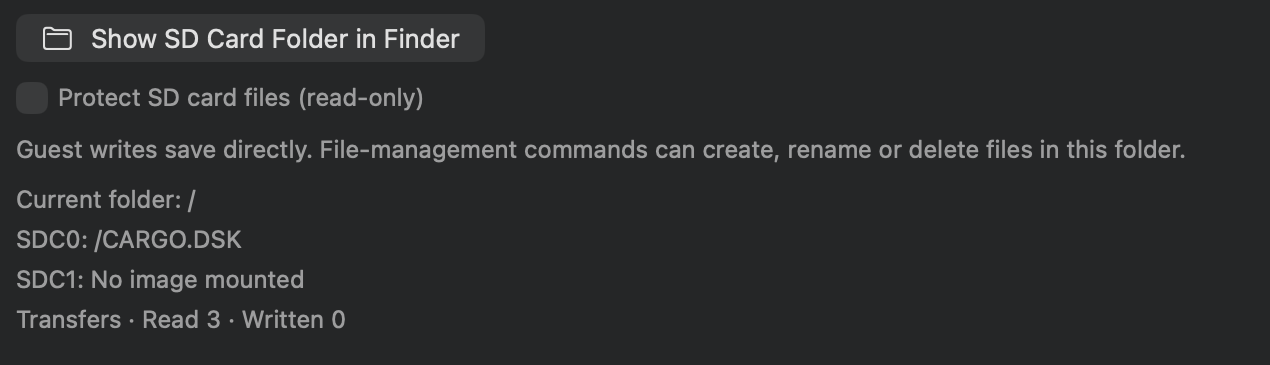
- Choose Cartridge → Cartridges…, find the CoCo SDC slot, and open its details. Choose Show SD Card Folder in Finder. You can reach the card controls from the cartridge in System view, too. Copy CARGO.DSK into the folder alongside HELLO.DSK and startup.cfg. Keep all three as separate files.
- For this reading lesson, enable Protect SD card files (read-only). Resume the machine if paused. Focus the CoCo display and wait for the SDC-DOS OK prompt.
A fresh card starts with a disk named HELLO.DSK in its first virtual drive. Making a personal profile alone can still point to shared media. It’s the Create Fresh Starter Media… choice that gives this experiment its own files.
Read the card and then read a disk
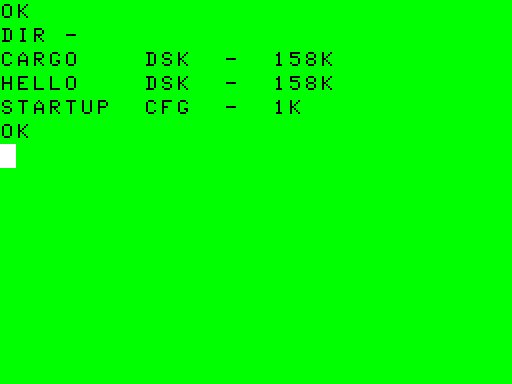
Enter DRIVE at the SDC-DOS prompt. On a fresh startup the first row should name HELLO.DSK. Now enter DIR - with a space and a minus sign. Look for CARGO DSK and HELLO DSK. This is the directory of the card’s current folder. You might recognize it from the Finder window. SDC-DOS displays a filename and its extension in separate columns.
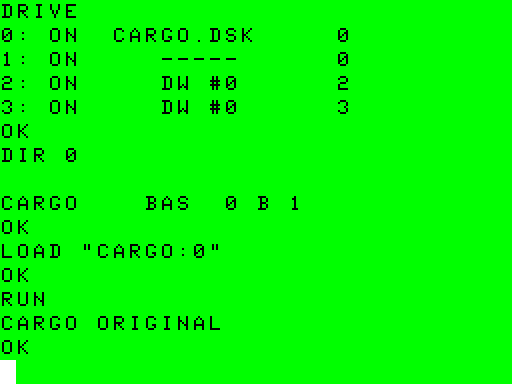
Mount your disk, then ask two different questions about it. Type each line separately.
DRIVE 0,"/CARGO.DSK"
DRIVE
DIR 0
DRIVE now lists CARGO.DSK in position 0. DIR 0 looks inside that image and lists CARGO BAS. Try explaining those two results to someone who has only seen the Finder folder. Which name would they need to mount? Which would they need to run?
LOAD "CARGO:0"
RUN
Watch for CARGO ORIGINAL and OK, just as on the FD-502. The disk and its BASIC file kept the same contents through the move. The device interpreting drive zero changed. In this setup, use the SDC cartridge’s mount display or the guest’s DRIVE command to see the image you selected.
Keep a second image handy
The card supplies two image drives. Leave CARGO.DSK on SDC0 and put the starter disk on SDC1:
DRIVE 1,"/HELLO.DSK"
DIR 0
DIR 1
Look for CARGO BAS in the first directory and HELLO BAS in the second. Type DRIVE again to inspect the two mounted filenames. In the SDC-DOS 1.75 listing you may see additional entries marked DW. The two SD image mounts you used here are rows 0 and 1.
The slash at the start of each path means the top of this card. The Mac folder itself can have a long name with spaces. For files the guest must find, use short names of up to eight characters plus an extension of up to three, as in CARGO.DSK. If the intended image is missing from DIR -, start by checking Show SD Card Folder in Finder. Copying the image into a neighboring Mac folder can leave a perfectly good disk out of reach.
Decide what the card remembers
Open the starter card folder in Finder and examine startup.cfg with Quick Look. The fresh file asks the card to mount HELLO.DSK as drive zero when it resets. The commands in this chapter changed the current mounts for the running session. Leave the starter file in place, and the next restart can bring HELLO back even though CARGO is still stored in the folder. Your profile remembers the folder’s location. Keep the folder itself when moving a collection.
Some software expects a whole family of disk images beside one another. The CoCo SDC edition of Double Dragon Arcade Port, for example, comes as nine disks and uses SDC-DOS to switch among them. When you encounter a set like that, keep the filenames and directory relationships in the author’s instructions. The Library’s text readme for that edition explains the first mount and the game controls. There’s no need to download the game for the CARGO lesson.
Leave a collection you only want to read protected. Turning off card protection lets guest software write disk images and manage actual files inside that Mac folder. Give an experiment its own copy first. This differs from FD0’s Temporary changes, where you can choose when to write one mounted floppy image back to its Mac file.