
← Manual LibraryVCC Plus 3.7.1 · Reading on the web

Try the exercises in VCC Plus. Example links download files here; open them in the app to work beside the emulator.

The complete book · PDF editionBook 12: Vibe Coding with ChatGPT

46 pages · VCC Plus 3.7.1 · Keep a copy to read or print.

Download PDF

At the CoCo workbench

Vibe Coding
with ChatGPT

A little Color Computer program can ask a surprisingly good question. Which planet would you like to visit? What is the capital of Kentucky? You can describe the game in ordinary words, ask ChatGPT to write a first draft, and watch a CoCo try it. The most interesting moment often comes when the CoCo does something neither of you expected.

Start reading →
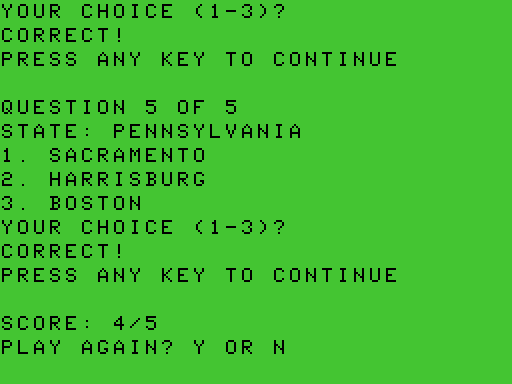
Assembly quiz showing the correct answer to the fifth question, Pennsylvania, followed by SCORE 4/5 and PLAY AGAIN? Y OR N.

In this book, vibe coding means making a program through conversation. You decide what the program should do. ChatGPT can read a draft, suggest a change and help investigate the result. VCC Plus gives you a place to see exactly what would change, decide whether to keep it and run it on the emulated machine. By the end you'll have a way to answer a very practical question. Did the program you kept actually do what you asked?

Set a place at the desk

You'll need VCC Plus for Mac with the build 30 interactive controls, the ChatGPT Mac desktop app signed in with access to Work and local MCP servers, and a folder for practice files. The lessons use a CoCo 3 running Disk BASIC. The C and assembly workspaces use the tools supplied with VCC Plus. Start with a disposable program, a few minutes at the keyboard and permission to share its contents with ChatGPT.

If you've never written a program, start with the first three chapters. One sentence changes a greeting, and you can try both answers. If you already program on a CoCo, make the first connection, then pick the chapter for your language. The capitals workshop brings the three paths back together.

The capitals workshop includes the complete example sources and a CoCo disk image. You can keep a copy to compare with your own first draft. In Chrome on Mac, Option-click a source link to save the file if a regular click opens it as text. Outcomes identified as recorded come from running the examples in VCC Plus. Prompts are invitations to try a task yourself. The words and code you get on your Mac can differ.

Other books on the shelf

Choose Help → Manual Library… in VCC Plus. Programming in CoCo BASIC on the Color Computer 3 is a good companion for numbered listings. Programming in C on the CoCo 3 — CMOC and Its APIs covers the C workspace and the bundled libraries. Your First 6809 Programs starts with registers and memory. Inside the CoCo 3 — Hardware and Debugging follows a running program more closely. You can also ask ChatGPT to find a section of an installed book during a lesson.

For historical magazines and manuals, the Archive Library has its own search.

Starting a larger project? Start a project you can hand off supplies an editable setup prompt and a downloadable folder of project standards, connection checks, test records and decision templates. The original CMOC and LWTools references cover the bundled compiler, assembler and linker alongside this library's teaching books.

Contents

Choose a chapter by what you want to do at the keyboard.

  1. 01

    Make the first connection

    Prove ChatGPT is reading the particular editor you meant to share.

  2. 02

    From an idea to a working program

    Write a small request, consult a manual, review a change and keep a useful test record.

  3. 03

    Give Mars a different greeting

    Change one numbered BASIC line and try both planets.

  4. 04

    Let the C compiler find the typo

    Follow a CMOC diagnostic back to its source and review a correction.

  5. 05

    Move a block one cell to the right

    Choose a processor and check what your machine-code program really did.

  6. 06

    Build a quiz and give ChatGPT the keyboard

    Play the small quiz in three languages, then follow the real 50-state Capital Quest project from its prompt through public MCP testing.

  7. 07

    Find the first wrong result

    Use a watch, a source stop or a few bytes of memory to investigate one mistake at a time.

  8. 08

    Keep a field guide at hand

    Recover a connection, recognize the limits of a run and look up unfamiliar terms.

  9. 09

    Start a project you can hand off

    Set working rules, verify project and reference access, and keep a reusable handoff record.

Original VCC Plus manuals © 2026 Brian K. Holman. Third-party references retain their authors’ copyrights and licenses. Artwork notices. Edition 3.7.1; source and export identity. Printable edition: PDF source and export identity.

A closer look

Open original