
Chapter 6 of 9
Build a quiz and give ChatGPT the keyboard
“What is the capital of Kentucky?” makes a good test question. A quiz that offers Louisville as a choice should let you pick it, tell you the capital is Frankfort, and count the miss exactly once. You can check all three behaviors by playing. You'll use the same test for a BASIC listing, a C program and a 6809 assembly program.
Play a round from the floppy
Choose the capitals game disk and save a copy as CAPITALS.DSK. Start a spare Disk BASIC machine and mount the image in drive 0. You can write-protect it. Give the CoCo display keyboard focus. At the OK prompt, type one of these commands and press Return.
| Game | Command at the CoCo prompt | After the fifth question |
|---|---|---|
| Extended Color BASIC | RUN"CAPITALS" |
Press 1 for another round or 2 to quit. |
| CMOC C | LOADM"CAPSC":EXEC |
Press a key for another round. To switch games, restart the spare guest and return to BASIC. |
| MC6809 assembly | LOADM"CAPSASM":EXEC |
Press Y to replay or N to quit. |
Press Space at the title and wait for question one. Try 0 while the quiz is showing its three choices. You should still be on the same question. Choose 1, 2 or 3, read the feedback, then press Space to advance. There is no need to press Return after each choice. These games watch for individual keys. Pressing Return again can carry you past the feedback you wanted to read.
The disk is a convenient way for you to play. To let ChatGPT take a turn, open one of the editable projects below and start its shared run. You can do the rest of the chapter without mounting the floppy.
Give the writer a playable brief
The three versions began in separate ChatGPT Work chats. Each chat had access to one VCC Plus workspace. If you want to write your own version, start with one language. Save any existing work and use a new practice draft or project folder. Here's a brief you can reuse.
Make a US state-capitals quiz for a CoCo 3 with a 32-column text screen. Include all 50 states. Ask about five different states per round. Offer three distinct capitals numbered 1, 2 and 3 and vary the position of the right answer. Retry an invalid key on the same question. After a miss, show the right capital. Wait for a key before clearing feedback. Show a score out of five and offer another round. Submit the complete source through my VCC Plus connection for review.
Add one of these directions, depending on what you've opened.
- BASIC. Ask for a numbered Extended Color BASIC listing using
INKEY$for single keys. Ask the writer to reserve enough string space for the names and keep variable names distinct in their first two characters. In the saved BASIC listing, line 20 reserves 5,000 bytes and line 40 reads the 50 pairs into arrays. A typo in the pair for Kentucky would affect every round that draws Kentucky. - C. Create a project with an editable
main.cin C Development. Ask for a CMOC program using the bundled CoCo library for keyboard and screen I/O. Ask ChatGPT to propose the complete replacement formain.cthrough the project connection. The saved C source keeps a state's name alongside its capital in aPlacestructure. Download the complete CMOC project for the same source and the Makefile VCC Plus uses to build it. - Assembly. Start an assembly project with a
main.asmand select MC6809. Ask for LWASM source with an entry address, the Disk BASIC ROM's character-input and output routines, and anRTSpath for quitting. The saved assembly source usesPOLCATto poll the keyboard andCHROUTto print a character. It uses the time you spend on the title screen to choose a starting state.
At review, read the Kentucky entry and follow one path from a wrong choice to the score. In particular, look for an opportunity to count the same question twice when a player tries an invalid key. Apply a proposal you want to try, then save the draft or project. A chat containing a pasted listing can be useful for discussion. The editable game you can reopen lives in the saved project.
Run the saved sources with ChatGPT
Start a fresh Disk BASIC session in VCC Plus. Use a disposable machine with a floppy controller, the cassette ejected, and mounted disks ejected or write-protected. If C reports that a BASIC program is already in memory, save any listing you want to keep and start with an empty BASIC session. Don't clear an unfamiliar program to get past the warning.
- BASIC. Select CAPITALS.BAS in the Mac reader to open an editable copy in BASIC Development. In a browser, save the listing and open it in Develop → BASIC Development…. From that editor's Local Assistant Access…, enable Allow proposed edits and controls for runs I start and save a review-and-run connection. Use Add to ChatGPT and start a Work chat. Opening an existing listing is enough for manual play. For the shared run, VCC Plus also needs a proposal you've applied to the current revision. Ask ChatGPT to change only the comment on line 10 to
10 REM US STATE CAPITALS QUIZ. Compare the two lines, choose Apply Edit, then Run on the applied proposal in the access panel. To play the exact original over MCP instead, begin with an empty practice draft and have ChatGPT submit the supplied numbered listing verbatim. Compare it with the saved file before applying and running it. - C. Save the CMOC project and expand the ZIP in Finder. Open the
CapitalsCMOCfolder containingmain.candMakefilein Develop → C Development…. Choose Assistant…, save its private project connection and use Add to ChatGPT in a fresh Work chat. Ask ChatGPT to build the current shared project and report any diagnostics. After a successful build, choose Run C Build… → Play in CoCo. The other choice, Inspect at main, is useful when you want to stop at the first source statement. For this round, wait for the title and the prompt to start. - Assembly. Save main.asm, then open the saved file in Develop → Assembly Development…. Confirm MC6809, then use File → Local Assistant Access… → Save Assembly Connection… and add this connection to its own Work chat. Ask ChatGPT to assemble the shared revision. Check the successful build and entry point
$3F00. Clear any source stop you set while experimenting. With the guest at the BASIC prompt, choose Run Shared Build… and confirm the launch.
Each choice above is a complete route to a game. You can test one language today and come back to another later. If you do test all three, give each connection a distinct file and return the disposable guest to a clean BASIC prompt between games.
Watch someone else take the quiz
Leave the quiz on its title screen. In the Work chat connected to that game, give ChatGPT both the controls and a stopping point.
Play one round using the active VCC Plus run. Read the guest screen and send the game keys yourself. Start with Space. Try 0 on the first question, then answer it correctly. Deliberately miss question two and read the capital the game gives you. Answer the remaining questions correctly. After each answer, read the feedback before sending Space. If the screen is slow to change, read it again. Stop at the replay prompt. Report the missed state, its capital and the score exactly as displayed.
The player obtains the active run ID with get_run, reads with read_screen_text, and sends a single letter, digit or space with send_keys. Each intended keypress gets its own request ID. A retry of the same key request reuses that ID so it won't count as another press. Give the player time to observe the screen between presses. If it stalls, ask what the guest currently displays. Seeing the replay menu yourself is a good way to check the final report.
What happened on the M2
On November 9, 2026, the first complete submissions for all three languages ran in VCC Plus build 29 on the M2 Mac. The operator reviewed the sources, authorized the runs and played the games. The original BASIC listing reached its title screen. Bundled CMOC and LWASM each built its first submission with zero diagnostics. The operator played each round to 4/5. All three saved game sources are byte-for-byte copies of the first proposals. Independent emulator runs on both guest processors also brought every one of the 50 states to the screen in each language.
With VCC Plus 0.1.0 build 30, the operator set up three fresh connections on the M2, reviewed and started BASIC, and built and launched C and assembly. This time the stock ChatGPT for Mac app sent every game key in three separate Work chats. A separate observer read the guest screen. Each player tried 0, deliberately missed the second question, and stopped at the replay prompt.
| Saved game | Correction displayed after the miss | Score in the guest |
|---|---|---|
| BASIC | Rhode Island — Providence | YOUR SCORE: 4 /5 |
| C | North Carolina — Raleigh | FINAL SCORE: 4/5 |
| Assembly | Kentucky — Frankfort | SCORE: 4/5 |
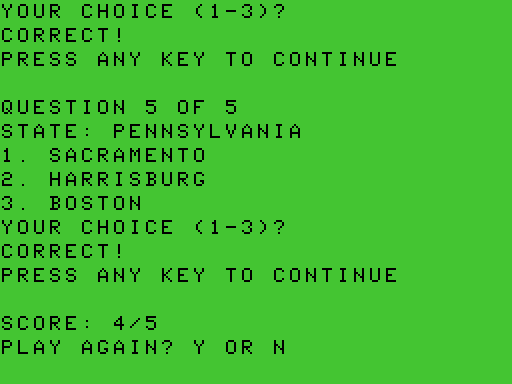
On that last screen, the assembly game is still running and waiting for a decision. If you want to test its exit path, ask ChatGPT to send N once. The program prints THANKS FOR PLAYING! and returns to BASIC. A finished run can report its final screen. Its game-key controls close when it returns. Revoke the connection after your round.
Grow the idea into Capital Quest
The five-question games above make the connection easy to understand. A later project, Capital Quest, took the same subject much further: every state in one 50-question quiz, a color map, typed answers and a review of mistakes. Its public CoCoCapitalQuiz repository contains the editable C project, map inputs and credits, a ready-to-play CAPITAL.DSK, sample screens, tests and the development brief. This is a separate game from the book's CAPITALS.DSK and its three short examples.
The core prompt generated an almost feature-complete program with ChatGPT Codex using GPT-6.1 Sol High. The initial delivery already included both quiz modes, all 50 states, map highlighting, spelling correction and a review of missed answers. VCC Plus supplied the installed toolchain and public MCP interface for building and playing it. The target is a 512 KB CoCo 3 with an MC6809, with a 320 × 192, 16-color map and Northeast/Hawaii detail views.
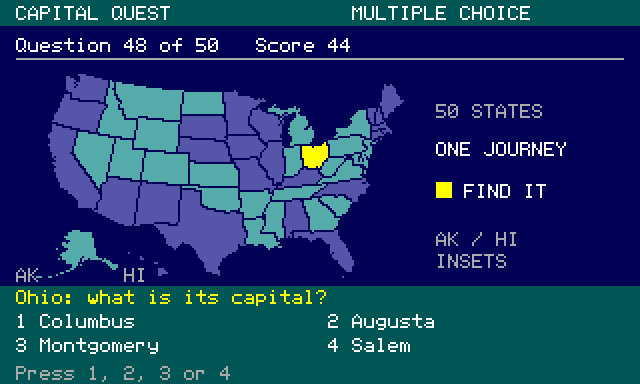
The map is adapted from © Fla-shop.com, under Creative Commons Attribution 4.0. The adaptation reduces resolution, simplifies boundaries, recolors and encodes the drawing data, and adds detail crops. The repository's assets/CREDITS.md retains the source, license and adaptation notices; C on the game's title opens its credits.
Give a larger project a richer brief
Open the project's complete CHATGPT_PROMPT.md to see what the writer was asked to deliver. Notice how much more it settles than “make a capitals quiz.” It specifies behavior, constraints, evidence and what to preserve while working.
| Part of the brief | What it lets you check |
|---|---|
| Ask all 50 states exactly once, numbered 1–50 | A complete round can reveal duplicates, omissions and off-by-one numbering. Alaska and Hawaii are included. |
| Offer four distinct choices and a typed mode | Both the menu player and the line editor need real tests. |
| Accept case and spacing variants, but handle a near spelling carefully | A close answer gets a correction opportunity, without an early point or an immediate answer reveal. Another state's exact capital remains a wrong answer. |
| Highlight the question's state and enlarge small regions | The map must agree with the data and remain useful at CoCo resolution. |
| Preserve attribution and convert graphics before running | The guest uses compact drawing data; it does not try to render an SVG. |
| Use ordinary guest input and actual framebuffer captures | The test must observe the running program, rather than setting its score through a debugger. |
| Keep source, assets, build instructions and test limitations | Another reader can rebuild, inspect and improve the result. |
The brief also asks the assistant to discover the installed tools and consult the manuals before choosing APIs. It gives the writer room to make routine design decisions while keeping the target machine, program behavior and testing method clear. You can use the same pattern for a word game, a music lesson or a small business application: describe a complete experience, then give it observations that can establish whether that experience works.
If you reuse the brief to create your own version, change its checkout path and read its assumptions first. It describes the original empty project. Today's download already contains a game. Use a new practice folder when you want to start over; preserve the supplied project when you want to study or extend it. The current prompt also includes a later Addendum for sound and automatic multiple-choice progression.
Follow the build and test loop
Open the project in C Development and use its Make recipe to combine C sources with the prepared map data. In Assistant…, enable Use Project Makefile and Allow Disposable Playtests, review the shared inputs and save a private connection outside Git. Begin with live tool discovery and get_capabilities so the assistant identifies the project, revision and available build choices.
Ask it to build the declared disk action in a named configuration and read get_build. When the build succeeds, use its artifact ID with start_playtest and poll get_run until ready. This creates a separate writable test disk and 512 KB guest, preserving the personal machine. Send ordinary physical keys with playtest_input, include release fields between presses, and inspect the actual framebuffer with capture_playtest.
Capital Quest's tests compare drawn text against the font in the matching build and selected-state pixels against the map masks. You can also inspect the pictures yourself: does the named state light up, are the four choices readable, and does the displayed score change when it should? For a logic question, use the build's advertised C-line or function-entry evidence and read-only snapshots. For sound, capture_playtest_audio supplies the guest's following bounded interval as a WAV. Chapter 4 explains its timing and key-release behavior.
Host logic tests and guest play complement each other. Host tests exercise thousands of shuffles and wrong-capital pairs quickly. Full guest rounds check input, screen layout, numbering, feedback, scores, review, replay and exit. The project's Test configuration uses seed 2709 for repeatable rounds; ordinary Release play mixes timing and start input into its seed.
Keep each result with its build ID, configuration and artifact. Choose Test when reproducing a particular sequence, and finish its run before building another configuration. Save evidence in a declared output folder or outside the watched checkout so captures remain separate from program inputs. Use scoped project refresh after changing shared files or build controls, as explained in Chapter 4. Stop the owned worker when you finish and keep its retained disk receipt with your observations.
See what the complete program delivers
A rich brief gave the project its shape. The core program shuffles all 50 states, offers four-choice or typed play, keeps the highlighted map associated with each question, and finishes with a score and paginated review. A close spelling lets the player edit or reveal; a successful correction earns one point and is tracked separately. This is enough to make a complete learning game from the original idea.
The next refinement added rising tones for correct answers and falling tones for misses using the CoCo's built-in sound. Multiple-choice feedback advances automatically after a readable pause, while typed mode keeps Space-to-continue. The prompt's Addendum captures that request. It is a useful example of shaping an already working program through a focused follow-up.
Further refinements made the map show the player's answer history: light teal for unanswered states, purple for correct answers, red for misses, and yellow for the current question. The current state stays yellow through feedback and takes its answer color when the next question opens. Northeast and Hawaii details follow the same rule, and a new quiz clears the history. These colors have no regional meaning.
Another follow-up changed multiple-choice placement. The first correct answer may occupy any slot; each next question chooses randomly from the other three. It excludes the previous question's correct slot even when the player selected a wrong answer. Host tests checked 100,000 question sets, and complete guest rounds checked the choices actually displayed. This is a useful refinement to test separately from shuffling the state order.
The project's test records include these complete rounds:
| Playtest | Recorded outcome |
|---|---|
| Multiple choice with deliberate misses | All 50 states once, numbering 1–50 and a final score of 42/50. |
| Typed answers with spelling exercises | All 50 states once, 47/50 and two successfully corrected spellings. |
| Ordinary Release play | A complete 50/50 round and the corresponding review. |
The mixed-answer rounds exercise scoring and feedback as well as correct answers. Tests also cover casing, multiword capitals, aliases, Backspace, long input, replay, held-key handling and clean return to BASIC. Read docs/TESTING.md and docs/FEEDBACK_TESTING.md for the original scenarios, and docs/MAP_PROGRESS.md and docs/ANSWER_SLOTS.md for the later map and slot checks. Those are dated development records. See docs/evidence/ for the retained receipts.
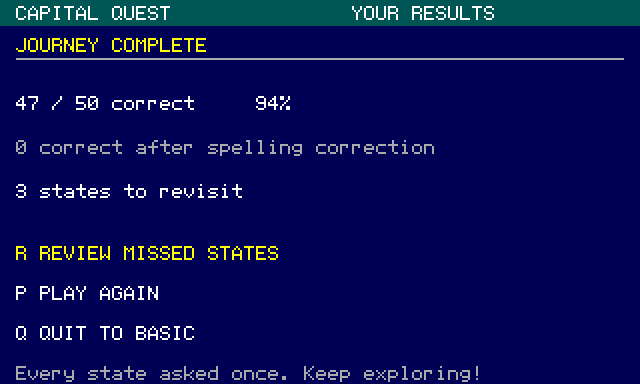
This results screen gives the player a useful next action: review the three missed states, play again or return to BASIC. The same idea belongs in your own program's completion screen. A score is more useful when the player can see what to practise next.
Try the delivered game, then change one rule
- Read the project's README and player manual. To play the delivered disk, mount your own
CAPITAL.DSKin FD0 of a CoCo 3 with 512 KB RAM and Disk BASIC. Preserve existing work, choose Cold Restart, wait for BASIC'sOKprompt, then typeDOS, orLOADM"CAPITAL.BIN":EXEC. RGB is the tested color presentation; both emulated MC6809 and HD6309 have been checked. Keep personal media separate. This route needs no assistant connection. - To inspect or rebuild, obtain the repository files through your browser or your usual Git client. Open that folder in Develop → C Development…. Select Release, then Build. The declared target builds the disk; use Show Build Products to locate this build's
CAPITAL.dskand binary. Preserve the map'sassets/CREDITS.mdand source notices with your copy. - To repeat the assistant workflow, use Assistant…, review the shared inputs, select the Make and disposable-playtest options, and save a fresh private connection. Discover its tools and ask it to identify the project, current revision and advertised configurations before building.
- Ask for a short observable check before a full round. The prompt below connects the current tools to a behavior from the original brief.
Build this project's advertised Test disk and start a disposable 512 KB MC6809 run of that artifact. Poll startup until ready. In typed mode, read the state from the actual framebuffer, try a close spelling, and capture the correction prompt before fixing it with ordinary keys. Show that the score changes once. Report what passed, what you could not observe, and the retained disk receipt when you stop. Do not change guest memory or registers.
The November 12, 2026 game edition uses 1 for multiple choice, 2 for typed answers and C for credits. Q (or lowercase q), Esc and CoCo Break quit to BASIC from every screen, including questions, spelling help, feedback, review and the automatic reading pause. VCC Plus maps the Mac's Esc key to CoCo Break. Release each key before the next action.
Multiple-choice answers use 1–4. Typed answers use letters, spaces, periods, Backspace and Enter. Press Enter with an empty answer to reveal the capital and count the question as a miss; clear any text with Backspace first. A near spelling offers R to edit or V to reveal. Q, Esc and Break quit rather than revealing an answer. Typed feedback waits for Space; multiple-choice feedback advances automatically. After a complete round, R opens the missed-answer review, N advances its page, B returns to results and P starts again.
Use the matching disk and player manual together. An existing Getting Started installation or personal source copy can contain an earlier edition. Reading the new online manual does not replace that disk. To use these quit controls, download the November 12 edition through the project's player guide and load a separate copy; preserve your existing disks and edits.
Now choose one small refinement of your own. Perhaps you want a longer reading pause or a different highlight color. Predict which observation should change and which should remain the same. Review the source edit, build the new revision and repeat that check on its actual artifact. The useful outcome is a program you can inspect and improve, together with evidence that explains its behavior.