
A program can change.
A number in a loop determines how often something happens. A condition chooses a path. A variable remembers an answer. Small programs make those relationships visible enough to predict and test.
Path one / Meet the Color Computer
The Color Computer—usually called the CoCo—is a family of Tandy/Radio Shack home computers. Its invitation is wonderfully direct: a keyboard, a screen and a language ready for your next instruction.
You give it input through a keyboard or joystick. A processor follows instructions. Memory holds numbers, words and the program being run. A screen and speaker give you output. A cassette or disk can keep something after the power goes off.
Those ideas also belong to a modern laptop. The CoCo gives you a smaller setting in which to see their relationship. You can write a command, change a loop, examine a variable and eventually inspect the instruction that changes a byte on the screen.
BASIC is a programming language, not a game menu. At its OK prompt, you can type an instruction immediately or build a stored program with numbered lines. Here is a browser illustration to try before opening the Mac app.
THE INSTRUCTIONS
10 PRINT "HELLO, COCO!"
20 END
THE REPLY
The CoCo is waiting for your instruction.
This small browser example illustrates BASIC. The full Color Computer runs in the Mac app.
The family, in a few milestones
Radio Shack’s first Color Computer arrived with 4 KB of memory and Color BASIC at $399. It connected to an ordinary television. Cassette storage, printers, joysticks and floppy-disk equipment expanded what owners could do.
History source: CoCopedia: Color Computer 1.
The Color Computer 2 followed in September 1983. Its more compact case and revised electronics continued the family’s approach, with models offering different RAM and BASIC combinations.
History source: CoCopedia: Color Computer 2.
Introduced July 30, 1986, the CoCo 3 started with 128 KB of RAM and a 512 KB upgrade option. Its GIME chip combined video and memory-management work. It added analog RGB and composite output alongside TV output, an expanded keyboard and Super Extended Color BASIC. The processor could run at about 1.79 MHz in double-speed mode.
History source: CoCopedia: Color Computer 3. These are historical hardware specifications; VCC Plus also offers later and virtual expansion choices.
Brian’s own first Color Computer came in 1982, when he was eleven. That was an earlier family member, before the CoCo 3. Read the story of the stock-show cow and the green screen.
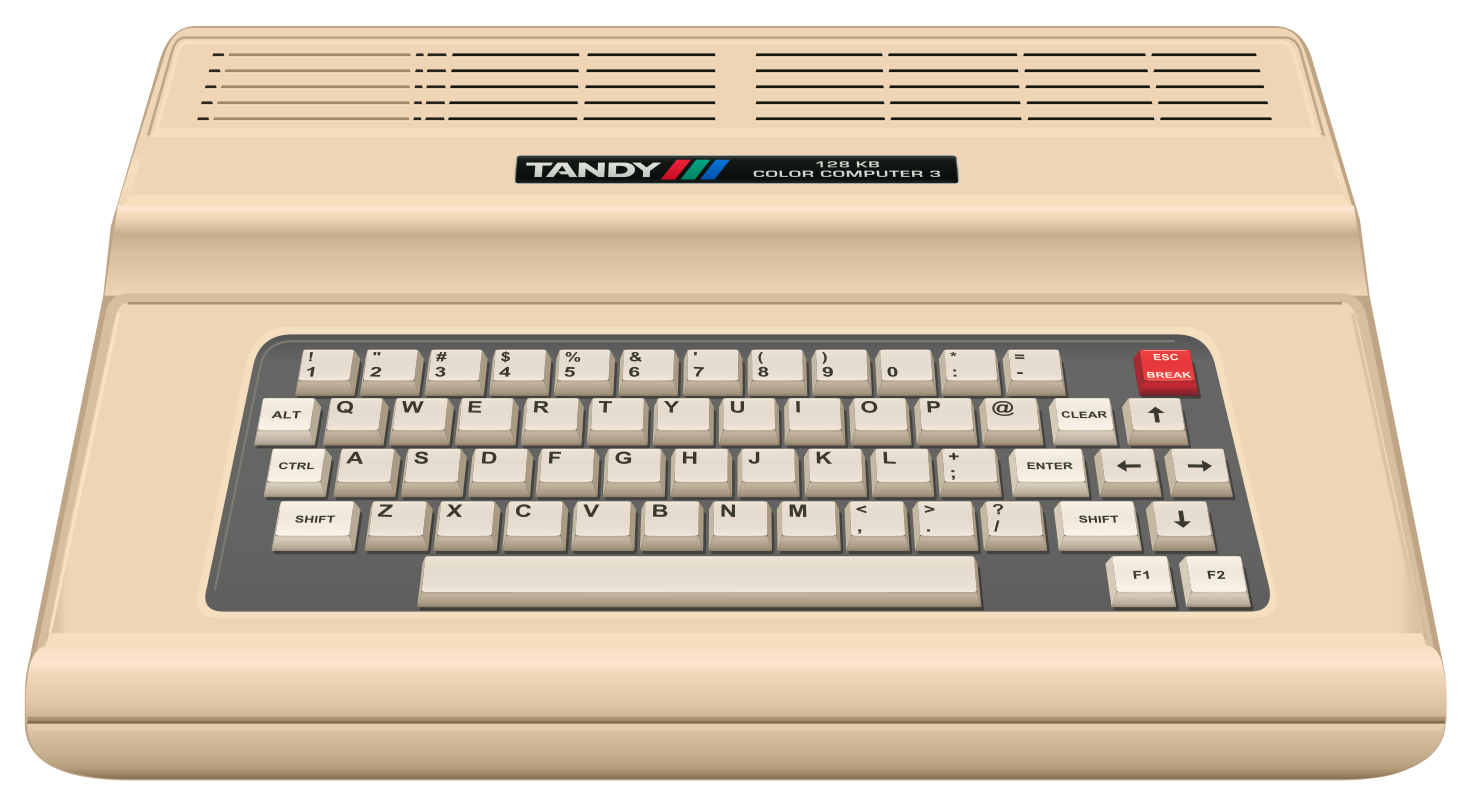 THE COLOR COMPUTER 3 · 1980s
The Radio Shack Color Computer 3 commercial is unavailable in this preview. You can still explore the machine’s history and hardware below.
Historical Radio Shack commercial. The illustration above is VCC Plus artwork, not a video frame. Historical video and trademarks belong to their respective rights holders.
Watch the era introduce itself
A period commercial shows how the machine was presented to people encountering it for the first time. Watch it as a historical artifact, then explore the working virtual system.
The physical computer in the commercial is the CoCo 3. VCC Plus runs the virtual computer on your Mac and surrounds it with modern development tools.
Match the picture to the hardware →Three useful ideas to take with you
A number in a loop determines how often something happens. A condition chooses a path. A variable remembers an answer. Small programs make those relationships visible enough to predict and test.
A controller is different from the drive attached to it. A disk image is different from the files inside it. A monitor’s signal can change how a picture looks. The illustrated VCC Plus desk gives those differences a place.
Start at BASIC’s reply. Later, follow source through a debugger, inspect memory or learn what a processor register does. You can choose how far to go without having to learn everything on the first day.
VCC means Virtual Color Computer. VCC Plus is a native Mac environment built around a virtual CoCo 3. Its BASIC, C and assembly workspaces, source and machine debuggers, disk tools, books and optional ChatGPT connection make it a place to create as well as revisit software.
You do not need original hardware to explore the virtual machine. If you do have a physical CoCo, the separate DriveWire companion lets your Mac serve disk images to compatible hardware.
Historical facts above are summarized from the linked CoCopedia articles, consulted November 11, 2026. The educational explanation and VCC Plus descriptions are original site copy grounded in the app’s manuals. Hardware illustrations retain the credits in our notices.