
Try the exercises in VCC Plus. Example links download files here; open them in the app to work beside the emulator.
51 pages · VCC Plus 3.7.1 · Keep a copy to read or print.
Inside NitrOS-9 Level Two
Working with
OS-9
Build a beacon station on your CoCo. Follow a report from a shell command through a process, a memory map and a device driver. Then write the program that sends it.
Start reading →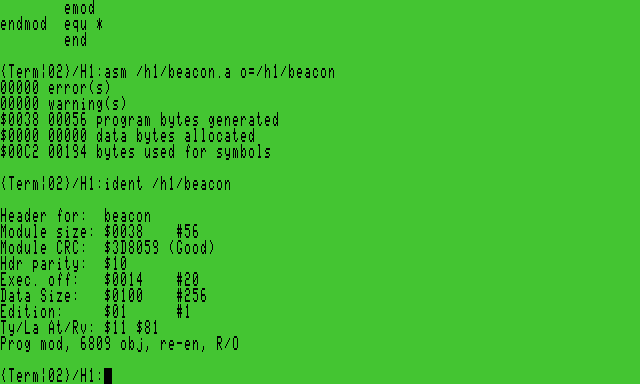
Contents
Start with a personal NitrOS-9 setup and fresh working HD1. Chapters 1–6 run the station, 7–11 look inside the system, and 12–14 build its programs. Use the appendices for command, device and system-call lookup.
- 01
Which program heard me?
Follow the boot into Shell+ and locate the data and execution directories.
- 02
Give the shell a job
Write and run a shell procedure in the station directory.
- 03
Where did the output go?
Join programs with a pipe and follow their standard paths.
- 04
A file has a name and an owner
Read a directory entry, change permissions on a copy and recover its contents.
- 05
Follow a filename onto the disk
Trace the saved report through its file descriptor to bytes on disk.
- 06
Recover the right copy
Restore an earlier working image and identify the copy you mounted.
- 07
Catch a process while it sleeps
Find the parent of a sleeping child and observe what happens when it exits.
- 08
Where does a program live?
Read a module header and watch a reference count change.
- 09
One address, two views
Translate a process address to an 8 KiB physical block and inspect the bytes.
- 10
Open a device by name
Follow requests through the terminal, disk and pipe file managers.
- 11
Who owns this terminal?
Open another CoCo window, draw a signal and return to the original terminal.
- 12
Put the night watch on duty
Write and pack the Night procedure and run it from Shell+.
- 13
Assemble a program on the CoCo
Assemble Beacon and inspect its position-independent module.
- 14
Deliver the beacon report
Run one program with two output destinations and diagnose a failed delivery.
- A
Find a command
Look up a command, a task or a name from the prepared command disk.
- B
Device and storage atlas
Locate devices, descriptors and records in the practice filesystem.
- C
System calls and errors
Find the service behind a request and interpret an error.
- D
Choose a language and a delivery format
Choose your language tools and identify the guest edition.
- E
Find your way back into the system
Find historical sources, earlier lessons and a reading route.
Search this book
Find matching sections in this book. This search runs in your browser; every keyword must match.
Original VCC Plus manuals © 2026 Brian K. Holman. Third-party references retain their authors’ copyrights and licenses. Artwork notices. Edition 3.7.1; source and export identity. Printable edition: PDF source and export identity.