
Chapter 7 of 14
Catch a process while it sleeps
You can leave a job running on the CoCo and still type another command. Try this with a program whose only job is to wait. You will have time to find it in the process table, see who started it, and finish it deliberately.
What came back?
Begin at Shell+ in your practice session. Enter each line separately.
sleep 1
echo %*
list /h1/absent
echo %*
Use a practice disk where absent is an unused filename. After the short sleep, the first echo prints 000. After list reports ERROR #216, the second prints 216. %* expands to the last command’s status in this Shell+. Inspect it immediately. Running another command can replace the evidence.
OS-9 gives each running instance of a program a process ID. When the shell starts an external program in the foreground, the child inherits paths such as standard output. The parent waits for the child to finish and can collect its exit status. A command that prints nothing can succeed, as Sleep just did.
Let two jobs overlap
sleep 3600 &
procs
The ampersand lets the parent shell accept another command while the child runs. The shell reports a number such as &003. Look in the Primary Module column for Sleep. Read across to Id, its own ID, and PId, its parent. During the illustrated run, Sleep was 3 and its parent was 2. Procs itself was another child of 2. It had to be running to report the table.
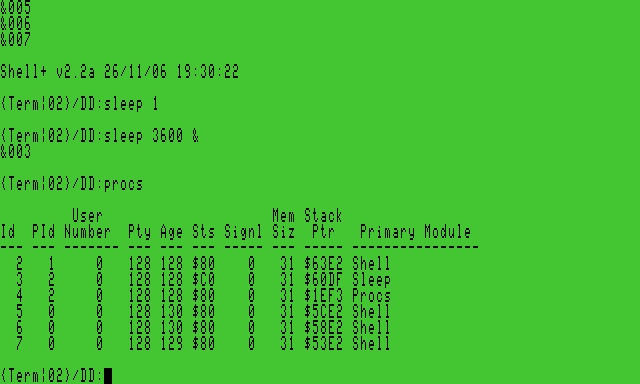
The Pty and Age fields belong to the scheduler. A runnable process competes for processor time. A sleeping or waiting process can give up its turn until its event occurs. Giving two processes the same base priority does not make their progress identical. The hour-long sleeper spends its time waiting. The interactive shell can be waiting for a key at the same moment.
End only the child you started
Type kill, a space and the Id you just observed for Sleep. Press Return and run procs again. The Sleep row should disappear. Other Shell rows belong to the prepared system’s other sessions. Leave those running.
The shell can report a child termination and error 228 as it collects the killed child. In this exercise that is the expected consequence of asking a process to stop. A signal and an exit status have different jobs. One delivers an event to a process that is still alive. The other tells a waiting parent the outcome after the child finishes.
At the operating-system interface, F$Fork creates a process, F$Wait lets the parent collect a child's termination, and F$Exit ends the calling process with its status in B. You will write that last call in the beacon report program. For the register contracts see The NitrOS-9 Project, NitrOS-9 Technical Reference, revision 0.1 (2004), pp. 99–100 and 128.