
Chapter 12 of 14
Put the night watch on duty
Your station needs someone to count three watches. In BASIC09 you can give the job a name, declare the storage it needs, and call it from either the language workspace or the shell. The same three lines of output will tell you when each version works.
Write the procedure on HD1
Start at Shell+ with the writable practice disk in HD1. Use new names for night.b09 and night so you can keep both the original and the packed copy. Enter one command per Return.
chd /h1
build night.b09
BUILD prompts with a question mark for each new line. Enter these six lines, then press Return at the empty prompt. The file is also available as night.b09.
procedure night
dim watch:integer
for watch=1 to 3
print "watch ";watch
next watch
end
The first line gives the procedure the name night. Its integer variable watch belongs to this procedure. The for assigns 1 before the first trip through the loop. Each next watch advances the counter and tests whether another iteration is due. Each trip prints a word and the current value on one line. end finishes the procedure. The loop has a name and a matching end point on the page, so you can follow it without line numbers.
Find it in the BASIC09 workspace
At Shell+ make the practice disk your execution directory and launch the language system from the system disk.
chx /h1
/dd/cmds/basic09
There are two independent locations here. The data directory is where BASIC09 opens night.b09. The execution directory determines where the packed version will be written. The absolute name /dd/cmds/basic09 still locates the language system after you change directories.
Look for Ready and the B: prompt. Enter:
load night.b09
run night
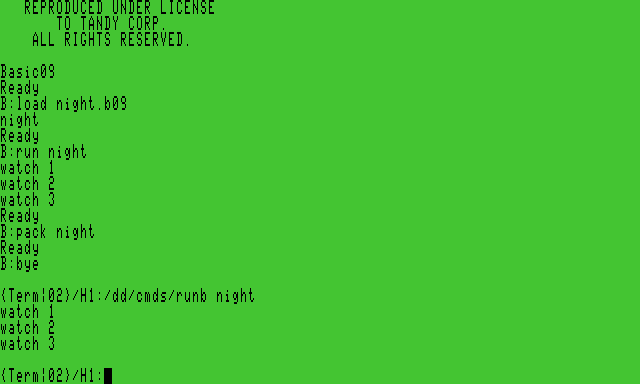
LOAD reads the text file and recognizes the procedure by the name inside it. RUN takes that procedure name. You should see:
watch 1
watch 2
watch 3
Ready and B: appear again. You are still in BASIC09. Compare the way you entered the source with programming in CoCo BASIC. On this disk BASIC09 is an OS-9 program with its own workspace and commands. The CoCo BASIC editor in the Mac Develop menu works with the ROM BASIC interpreter.
Hand it to the runtime
At B: enter the next two commands.
pack night
bye
PACK writes a module containing the procedure's intermediate code. BYE leaves the language workspace. Now launch the smaller BASIC09 runtime from Shell+.
/dd/cmds/runb nightThis time you should see three watches and then the OS-9 shell prompt. RUNB looked up the packed procedure by name and ran it without opening the editing workspace. In this configuration giving RUNB the full path as its procedure argument produced error 043. Use the execution directory and the procedure name shown above.
Restore normal command lookup when you finish.
chx /dd/cmds
dir /h1
Find night.b09 and night. Keep the first file to edit the original text. The second can run under RUNB. In the next chapter you will give the station an executable module whose body consists of 6809 instructions.
For the language and its workspace, see Microware Systems Corporation, BASIC09 Programming Language Reference Manual, revision H (1984), “Introduction to BASIC09 Programming” and “Program Statements and Structure.”