
Chapter 5 of 14
Follow a filename onto the disk
What did OS-9 actually do when you asked for /h1/station/report? The text occupies 23 bytes. To reach those bytes, the operating system first had to read two directories and a file descriptor. You can reconstruct its route from a real working disk without writing a single sector.
Compare the file and the volume
In the station directory, enter:
free /h1
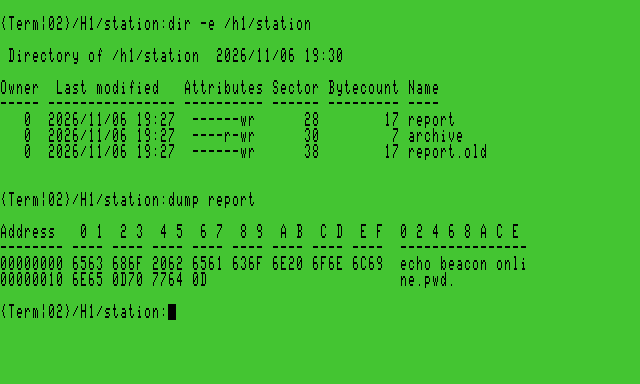
dir -e /h1/station
dump report
Our fresh practice filesystem identified itself as VCC Shared Data. Its capacity was 368,640 sectors in clusters of eight. A sector here contains 256 bytes. A cluster therefore accounts for 2,048 bytes of allocation. Your free-sector count will change as files and directories appear. These figures describe the OS-9 filesystem inside the shared image. Other parts of that same image can hold BASIC volumes.
Dump starts counting at byte zero of the file. Look for 65 63 68 6F, the ASCII bytes for echo. Look for 0D after online and again after pwd. Each carriage return is one byte. The length shown as hex 17 in the directory agrees with 23 bytes, including those two line endings.
Walk from a device name to the first text byte
The table was decoded from the actual HD1 image used to make that screen. Numbers beginning with $ are hexadecimal. The operating system assigns sectors as the disk changes, so use the chain of references when reading a different image. An extra file created earlier can move every later allocation.
| Read this object | Find this field or entry | Follow it here on the example image |
|---|---|---|
| Volume description, logical sector 0 | Three bytes at offset $08 name the root directory’s descriptor | 00 00 18 → sector $18 |
| Root directory descriptor at $18 | Its first segment starts at $19 and spans seven sectors | Read root directory records beginning at $19 |
| Root directory record named station | Last three bytes name its descriptor | 00 00 20 → sector $20 |
| Station directory descriptor at $20 | First segment starts at $21 | Read 32-byte directory records beginning there |
| Station directory record named report | Last three bytes identify its descriptor | 00 00 28 → sector $28, also shown by the guest’s detailed listing |
| Report descriptor at $28 | File length is $17. First segment starts at $29 and spans seven sectors | Read only the first 23 bytes at $29 |
| File data at $29 | The bytes start with 65 63 68 6F and end in 70 77 64 0D | These are the same bytes printed by the guest’s Dump |
For a raw image with this filesystem starting at byte zero, sector $29 begins at byte $2900. The extent describes allocated sectors. The file-size field tells a reader where valid file content ends. Space reserved after a short file’s last byte is not part of that file.
Inspect the sector on your CoCo
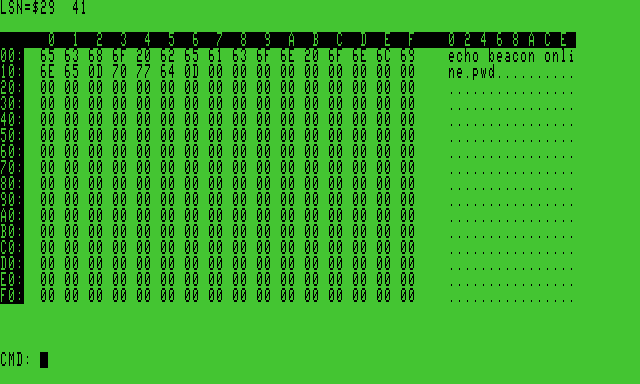
On a personal practice image, use the disk editor as a viewer. Enter ded /h1@ at Shell+. The trailing @** selects the entire device. The first screen identifies logical sector zero in the upper left. Use row and column labels to read the three bytes starting at $08. To follow their value, press S, enter the hexadecimal sector number at the sector prompt, and press Return. For example, our first jump was 18. Use S** again to follow each link in the table, taking the values from your own disk. Directory records are 32 bytes each. If a name is farther down the directory, continue in its data segments.
At the sector containing the first bytes of report, compare the right-hand character display and the first 23 hex bytes with the file dump you saw earlier. The disk view can display 256 bytes even though this tiny file ends much earlier. Press Q, then Y at the quit confirmation to return to Shell+. These steps only read sectors. The editor’s other modes can write raw disk structures. Use the navigation keys above for this exercise.
Where the allocation map fits
Sector zero records the size of the map in bytes ($1680) and the number of sectors represented by one bit ($0008). $1680 bytes times eight bits per byte times eight sectors per bit accounts for the reported 368,640 sectors. Here the map starts at sector 1. A set bit marks an allocated cluster. The first bitmap byte in the pictured exercise was FF. It covered sectors $00 through $3F, including the volume structures and the practice files.
When opening an existing file, RBF follows directory entries and segments. When it needs more space, the bitmap helps it locate free allocation units. A directory entry does not record a run of text sectors, and the bitmap does not say which filename owns a particular cluster. Together these structures answer different questions about the disk. The storage atlas gives the field offsets for the example.