
Chapter 4 of 9
Let the C compiler find the typo
One extra letter can stop a whole C project from building. You'll put that letter in a practice copy of Hello Disk, ask ChatGPT to get the compiler's diagnosis and review its repair. When the build succeeds, the CoCo will read five words from a floppy. That gives you something to check beyond the message that says the compiler finished.
Give the compiler a small problem
- Choose Develop → C Development…. Click New, choose Hello Disk, and create a practice project in a new folder. Open
main.cand look near the end ofmainfor the line that prints the generated word count. - Add a lowercase s to the end of the variable name. In the supplied project that's line 14. Leave the printed message unchanged. Check your altered statement against the one below.
printf("GENERATED WORD COUNT: %u\n", generatedWordCounts);- Click Assistant…. Expand Files shared. Alongside
main.cyou'll see the headerinclude/hello.h, the C files insrc, andassets/words.txt. Choose Save Private Connection…, give the C connection its own filename, then use Add to ChatGPT. Open a new Work chat and use Copy First Prompt to confirm the project. The compiler can work with your open draft, including the typo.
Build the current revision of my shared Hello Disk project. Report the first compiler diagnostic with its file, line and exact message. Read the relevant project header, then propose the smallest repair through VCC Plus.
CMOC reports undeclared identifier 'generatedWordCounts' in main.c. An identifier is a name in the source. Compare the diagnostic with the declaration in the header.
extern const unsigned char generatedWordCount;C treats the singular and plural spellings as different names. The declaration tells the compiler that the project supplies an unsigned byte named generatedWordCount. Removing the final s makes the statement refer to that byte. If the initial build succeeds, compare the variable in your editor with the altered line above and ask ChatGPT which project and revision it built.
Apply, rebuild and read the disk
Read the current and proposed lines in the VCC Plus review window. Choose Apply Repair when the proposed change removes the extra letter. Look for the applied revision. A revision identifies the particular draft the assistant built or edited. The failed build belongs to the earlier revision. Click Rebuild to compile the applied revision and watch for the successful result.
Before starting the program, leave a running Disk BASIC system at an empty OK prompt. Hello Disk needs FD0 empty so VCC Plus can temporarily mount its generated disk there. Save any disk changes before ejecting it. If a BASIC listing is still in guest memory from the previous lesson, save any open BASIC editor draft, use Read from CoCo and Save As… to keep the guest listing. When you are ready to clear its program and variables, type NEW at the CoCo prompt.
Choose Run and Verify. VCC Plus matches an instruction in the running binary to the source, continues execution, checks for a floppy read and shows the program's output. Look for HELLO, WORLD, CMOC, VCC and PLUS, followed by DISK RESULT: 0 and GENERATED WORD COUNT: 5. Compare the words with assets/words.txt. Save your repaired project if you want the corrected sources on disk.
Play an ordinary C program
For a program that takes keyboard input, create a separate project using New → Hello World. This starter offers Earth or Mars in a single C file. Share the new project from Assistant… and ask ChatGPT to build its current revision. An ordinary shared build compiles the project's C files with bundled CMOC. For a project with its own Make rules, use the connection described below. An ordinary shared build can run with a write-protected disk in FD0.
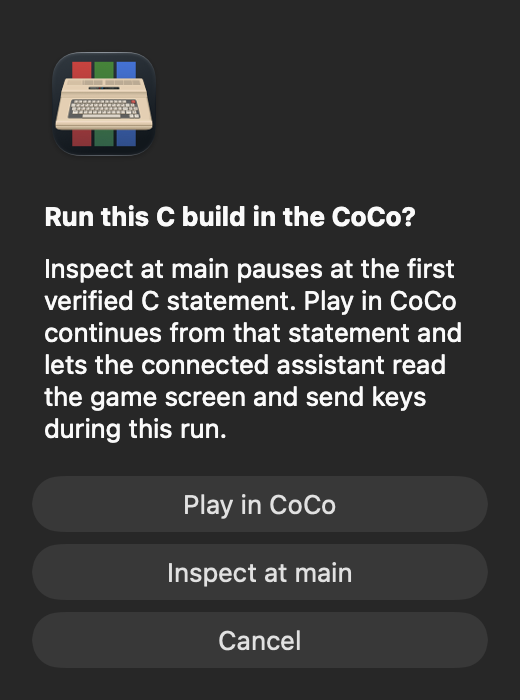
Choose Run C Build…. Play in CoCo continues from the first verified statement in main and lets the connected assistant read the screen and send game keys. Inspect at main pauses at that statement so you can ask which source line and machine address were reached. Choose Play in CoCo for this exercise and give ChatGPT the keyboard task below.
Read the menu from this C run. Send the key for Mars, wait for the program to return to BASIC, and report the greeting from the final text screen.
Look for Hello Cold Red Dot World! The previous chapter changed the BASIC draft. This greeting comes from the C program you just built. A finished run can report the text captured at return. To choose Earth, start a fresh run.
Keep a project's Make rules
A larger game may combine C, inline assembly, generated graphics and a custom linker layout. Open its project folder in C Development. In Assistant…, select Use Project Makefile, check Files shared, and save a fresh private connection. This permits the local host commands in that Make recipe and its compiler inputs. The native Build button and the assistant then use the project's declared recipe with the installed bundled toolchain. Its headers and inline assembly can stay in place.
Leave the checkbox off for the ordinary restricted C connection used earlier in this chapter. That builds ordinary sources with an app-generated recipe. Hello Disk also has its own installed recipe and verification flow. Choose the mode that matches the project you intend to share.
Suppose your repository contains game/Makefile and a sibling tools folder of packers. Open game as the project. In its existing vccplus-project.json, add "buildSupportDirectories": ["../tools"], or enter ../tools in Project Settings' Build-support folders field. The build snapshot copies that explicitly named folder beside the project so the recipe's ../tools paths still work. Inspect the listed support folders before saving the connection.
Identify this project's current revision, approved Make recipe, build actions and configurations. Build the current revision using its declared disk action and Release configuration, if those choices are available. Report the build ID, result and first diagnostic. Do not start the CoCo yet.
The assistant reads these choices through get_capabilities and requests the declared build or disk action through build_project. It can choose a listed configuration; it cannot invent a Make target or send extra command arguments. Source edits advance the revision. Assistant source-edit proposals do not change Makefiles, scripts or project configuration. Make those changes locally, then use the scoped refresh below and review the changed build controls. An older connection without refresh needs a fresh export instead.
A successful disk build does not establish that a packed game has a verified C run or debugger stop. A custom project can generate a banked debug manifest that binds its packed binary and disk to original source, linker, object and listing evidence. Its source set includes the complete retained compiler output, so large type records can be recovered from hash-verified assembly when the assembler listing truncates a long comment. VCC Plus checks the unpacked module bytes and actual physical RAM banks before showing source locations or values. Expected bank switches retain that connection. Optimized locals and unknown frames remain unavailable. A successful recipe is not proof of a debugger stop or of the game's behavior.
Deliver the build you already tested
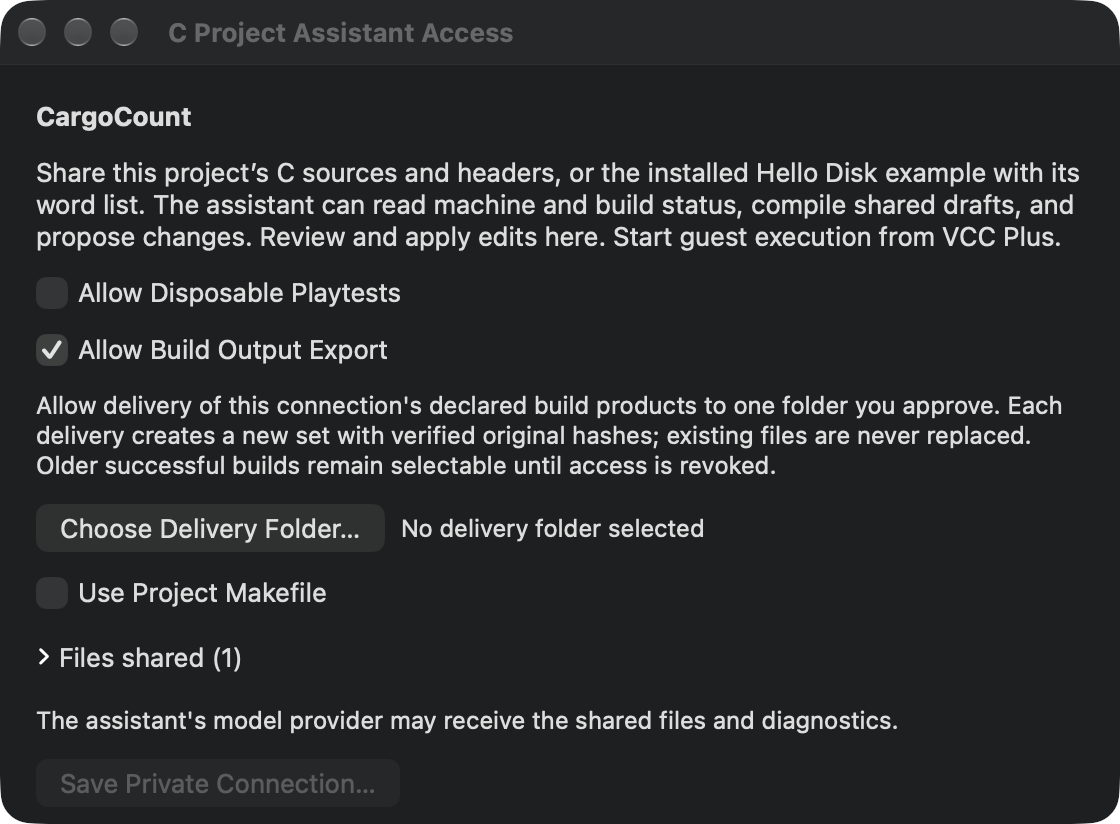
A successful build has its own identity and frozen products. To let an assistant deliver those files, open Assistant…, select Allow Build Output Export, and use Choose Delivery Folder… before saving a fresh private connection. This permission is separate from permission to run disposable playtests. The assistant receives an opaque destination ID rather than access to browse Mac folders. Older connections keep their existing permissions.
Build the normal Release and Debug configurations. Keep both build receipts. Export each configuration's declared binary, Home disk, Data disk and Home alias, if this project declares them, to the approved delivery folder. Do not build again to retrieve files. Independently compare every delivered length and SHA-256 with the original build receipt, then give me the two delivery sets.
get_build lists exportable_outputs. The assistant selects those output IDs and the exact original project/build/artifact/revision with export_build_outputs, then polls get_build_export until completion. Building Debug does not erase the previous Release choice. Each delivery gets its own verified folder, so identical filenames do not silently replace another configuration's files. An identical request retry verifies the prior delivery; a changed request or changed delivered file is reported as a conflict.
The binary, primary disk, existing debug manifest and additional playtest disks are declared products. Use exportOutputs in project settings for other concrete relative deliverables or aliases; an output directory is not a permission to export everything found there. A delivery preserves frozen build bytes. It does not include a playtest's later saves or publish software to the website. Build → Show Build Products remains available when you want the native route.
Refresh the inputs you meant to share
Connections that advertise project_refresh can inspect the approved project inputs and request a scoped refresh after an external edit. Ordinary edits to shared files update the revision. New shared files or changed build controls open a native review showing the additions and exact before/after contents. You can approve or reject; neither choice runs the project. Your unsaved drafts stay intact, and conflicting disk edits still need local resolution. Saving screenshots or receipts in a declared output folder does not change the source revision.
Use read_project_inputs to list this project's included files and excluded output folders. I added a header locally. Request refresh_project at the current revision and report the review ID. Poll get_project_refresh for my decision, then identify the new revision before building. Keep unsaved drafts.
The manifest explains each input's role, inclusion and hash; it is paged, so ask for later pages when needed. New files, changed recipes and support scope need local review. Pending or rejected changes block builds and runs. Approval adopts the reviewed input set; it does not execute Make or start a game. If a file on disk conflicts with an unsaved editor draft, resolve that conflict locally.
Keep source resources separate from generated results in vccplus-project.json. resourceInputs names intentional data files, generatedInputs names retained generated inputs, and outputDirectories names result folders to exclude. These are literal project-relative paths. An approved sibling support folder remains an explicit choice; a dependency file cannot grant access to another folder. Touching an unchanged file alone does not change its content-based revision.
The build cache is a disposable working copy. VCC Plus can repopulate it when its receipts or dependencies no longer match approved inputs; it does not run an arbitrary project's clean recipe to repair the cache. A stale-state reply can name changed paths and expected/current identities. Read that evidence and refresh the actual project rather than deleting source or changing a request until a refusal disappears.
Let an assistant play a test copy
Select Allow Disposable Playtests in the C Assistant panel before saving a connection. This permits the assistant to launch the current built disk in a separate 512 KB CoCo, with MC6809 as the default and HD6309 available when the connection advertises processor selection, without changing your open machine or mounted media. It can hold combinations of physical keys and standard joystick axes and buttons for bounded video fields, capture the game's graphics, and cold restart its own writable test disk. You need not approve each test launch after granting this option. Rebuilding, changing the shared revision or revoking access ends that run.
Build this revision's disk. Start a disposable playtest of that exact artifact. Capture its title screen, describe the controls, and test a short movement and jump. Report the run ID, field counts and what the images actually show.
The assistant uses start_playtest, playtest_input and capture_playtest. restart_playtest keeps the same writable disk, so save and load tests use the game's real controls. stop_playtest retains the test disk in VCC Plus development results. Inputs have request IDs: an identical retry returns the prior receipt without repeating movement. The clock measures completed emulated video fields, not wall time or the game's own update count. A breakpoint can end an input plan early; read the returned clock and remaining field/restart allowance before continuing.
Starting a disposable playtest can return starting while VCC Plus verifies the build evidence and boots the machine. The assistant should poll get_run for progress and readiness before sending keys or debugging. Retrying the same request recovers that startup; a new request must not create a duplicate machine. The reserved run can be stopped while preparation is pending.
Keep the original project, revision, artifact and request IDs if a connection times out. get_run reports the preparation phase, busy and a terminal failure when one occurs. A ready startup has a worker receipt; check its actual state and stop evidence before claiming the requested function was reached. To cancel a pending start, use stop_playtest, then poll until cancellation has finished. An interrupted transport is not proof that no guest was created.
Typed answers can combine letters, space, period, backspace and enter. For example, the assistant can type ST. PAUL, correcting a letter with Backspace before submitting. These are physical CoCo keys; an empty key array releases them, and Shift works as a normal held chord. This applies to disposable playtests. The ordinary shared-run send_keys tool retains its smaller key set.
Test disk changes without restarting the program
A game can keep its program in memory while asking for another disk, or use Home and Data together in different drives. In Project Settings → Build, declare additional project-relative playtest disk outputs. The approved Make recipe must produce them with the primary disk; each run gets separate writable copies. Up to eight additional floppy products are supported.
Fresh multi-drive connections can select FD0–FD3. Earlier media connections keep FD0-only exchange, so inspect live capabilities after reviewing a new connection and restarting its helper. Omitted drive still means FD0.
Build Home, Data and the deliberately wrong test disk. Start the owned Home run, pause at an appropriate prompt and insert the listed Data copy in FD1. Use the game's normal controls to load an uncached level, save to Home0 and reload. Compare per-drive activity and exact hashes: Data1 should remain unchanged when the game saves only to Home. Repeat the game's empty, wrong, damaged and write-protected media recovery paths without changing its memory.
list_playtest_media lists artifact products and their IDs/hashes. Include run_id to inspect that run's current private copies, because guest writes can change their hashes. exchange_playtest_media takes a listed media ID, its exact current hash and the target drive. On insert, optional write_protected: true provides a real protected private image; omission preserves its existing setting. The assistant supplies no Mac path. A writable copy cannot occupy two drives at once: eject it before moving it. Distinct private copies can have identical bytes.
Pause explicitly before inserting or ejecting. The shared floppy controller must also be idle: a keyboard prompt or stopped motor alone does not prove a pending command is complete, even if it belongs to a different drive. Replacement durably retains the outgoing disk first and affects only the selected drive. It does not reset the guest, change BASIC's default drive, alter RAM/registers or advance the field clock. Resume with normal input and inspect the game's response; a mount alone does not prove it accepted the volume, edition or checksum.
Fresh receipts show all four drives, their current copy identities, original and current hashes, protection, generation and actual transferred-byte activity. Read/write bytes are not counts of successful Save commands. Combine them with exact disk contents and the game's own save/reload result. Older top-level disk fields continue to describe FD0.
restart_playtest preserves all current drive assignments and writable copies; ensure FD0 holds the intended DOS boot disk first. It does not move Home from a nonzero drive automatically. stop_playtest freezes and independently retains every disk, including ejected copies, before ending the worker. Later starts can select saved copies through retained_media; the primary retained-disk fields still identify the primary product wherever it was mounted. Saved originals stay unchanged. This resumes disk contents, not CPU/RAM state. Startup drive maps are not added: use explicit paused exchanges for the other drives.
Reuse a request ID only for the identical drive, selection and protection plan. After an exchange, obtain a fresh debugger snapshot even though guest time did not advance. A lost reply is uncertain; retry the identical request under current authority rather than issuing a new mutation that may repeat a completed swap.
Test a joystick without changing your controller setup
A fresh disposable-playtest connection supports both standard CoCo joystick ports, independent of your personal gamepad, mouse or keyboard assignments. For each playtest_input step, keep keys and fields and optionally add joysticks. Each port snapshot names right or left, integer x and y positions from 0 to 16383, and buttons containing fire1, fire2, both or neither. Center is 8191; X increases rightward and Y downward.
{"run_id":"<owned run>","request_id":"walk-left-fire","steps":[{"keys":[],"fields":12,"joysticks":[{"port":"right","x":0,"y":8191,"buttons":["fire1"]}]},{"keys":[],"fields":6}]}Each step replaces the entire keyboard and both-port state. An omitted port centers and releases its buttons. Omitting joysticks centers both ports. Every completed or interrupted input plan releases keys and centers the sticks. The receipt's input_trace shows the input applied during each step and its actual completed fields; final input shows the released state. These observations confirm delivery, not that the game responded correctly. Read the game's controls and inspect screenshots of actual movement, jumps and menus.
get_playtest_input reads the owned machine's input and clock without advancing it. For the personal shared machine, get_machine_status.input instead separates the native controller preview, the last submission and the actual core input. It reports source, interface, connection and focus availability without revealing controller identities or unrelated key contents. Preview movement alone does not prove delivery; a paused machine releases its input. These tools do not alter personal input settings. Standard analog playtest input does not simulate the app's optional high-resolution joystick interfaces.
Discover joystick support, then test right-port movement, Fire 1 and release through the guest's normal controls. Capture before and after frames. Compare the input trace with what the game actually did. Do not substitute keyboard arrows for a joystick-only acceptance test.
Compare two graphics pages without advancing
For graphics projects whose verified manifest declares extra buffers, pause and use capture_playtest_graphics. The assistant can compare the register-selected picture with one declared buffer by ID at the same stopped state. The returned images and physical identities help diagnose page flipping without writing RAM or advancing the guest. Normal capture_playtest still shows the last published video frame, which may precede a register change.
For a custom scrolling GIME game, the project can declare bounded current_gime canvases in its verified manifest. Captures preserve the live viewport, row stride, pan, palette and relative video offset when comparing the two pages. Fixed HSCREEN previews keep their BASIC layout. An escaping viewport is refused; the assistant must not mislabel a custom canvas as HSCREEN 2.
Pause this owned run. Capture the normal framebuffer, then use capture_playtest_graphics for the declared back-buffer ID. Report which image is the last published frame and which is the paused register preview. Compare the canvas, viewport offset and physical identities without changing video registers or supplying an unapproved address.
A paused preview shows the registers and memory at one frozen state. It does not reconstruct an earlier scanout or guess an undeclared page. The project declares canvas origins, bounds and layout in verified build evidence; this capture tool accepts a buffer ID, not arbitrary memory addresses.
Keep a save between test sessions
After an app update or a later connection, list_playtest_disks finds the project's recorded test disks. The assistant can select one by its retained ID and exact hash when starting a new test. That cold-boots a separate writable copy; use the game's normal Load or Continue command to restore its saved data. The retained original stays unchanged; stopping the resumed run creates its own retained ID with a parent link. A recorded disk requires the same base artifact bytes. artifact_disk_sha256 identifies the current produced disk, disk_original_sha256 identifies the saved copy initially loaded into this run, and disk_sha256 tracks its current writable contents. These need not be equal after the game saves. Older retained disks require their previous run ID and exact hash and report legacy_receipt origin: the earlier artifact provenance was not recorded and is not invented by rebuilding today.
To examine files in a saved disk yourself, keep a separate copy and use Media → Floppy Disks… → Open Disk Image… for the native Disk Image Editor. You can browse supported DECB or OS-9 directories and export the game's saved files. Keep the app-managed retained disk unchanged: its exact hash belongs to the resume receipt. Editing a separate copy does not turn it into a new retained MCP selection. Applying edits to a mounted disk is a separate local action that locks the machine and requires a confirmed restart.
Choose a stop the build can prove
For a project with verified debug evidence, the assistant can start at a named C function, pause or instruction-step its owned run, inspect locally configured named watches, and read only the advertised stopped-program memory ranges.
The build receipt's source_debugging.functions lists names with a mapped C statement. source_debugging.function_entries lists verified executable symbols, including assembly routines. Choose a name from the matching list. An assembly input sampler can use stop_kind: "function_entry": the snapshot reports its real symbol, current address, RAM bank, registers and declaration location. It leaves source_stop empty where no C statement is mapped, and instruction steps there are labeled assembly_instruction. A declaration line is not the executing C line. Verified shared globals remain available; frame locals are not guessed.
An optimized Release build may have verified executable symbols but no typed C frame metadata. Its receipt reports source_only, with executable_symbols and unavailable variables. A verified symbol can still stop execution and expose registers and permitted code bytes. Such snapshots report symbol_stop and executable_stop; they do not invent a C function range, watch value or frame. Use the selected build's own evidence, never addresses borrowed from Debug.
A fresh C playtest connection can also advertise get_call_context. After get_debug_snapshot, use that same run and snapshot ID to read its bounded 64-byte window at the guest's current stack pointer. Raw words remain uninterpreted. Caller and integer argument values appear only where the compiled metadata and call instructions prove them; optimized or unknown layouts stay unavailable. A step, restart or rebuild requires a new snapshot. This reads only the owned disposable guest and never edits its registers or memory.
Read the error that stopped the build
When a build fails, read the build receipt's log as well as source diagnostics. It preserves bounded combined compiler, linker and Make output, the exit status and whether output was truncated. A warning list alone may omit the fatal reason. On a diagnostics-enabled connection, ask for the first actual error and any remaining build-log pages. The receipt distinguishes a compiler, assembler, linker or Make failure when the retained evidence identifies it. Successful builds can still carry warnings. Debugging receipts list verified C-line stops, function entries and available global declarations; unavailable values need an explanation rather than a guessed result.
Read get_build for this failed build. Report first_error, failure_stage and exit_code. Use get_build_log and its next_offset to read the remaining retained output. Distinguish the actual error from warnings, and say whether any process output was already dropped. Propose a repair only after locating the cause.
The log combines compiler, assembler, linker and Make output; it does not pretend to separate stdout and stderr. A zero process exit can accompany a later validation failure when the produced artifact is unacceptable. If Make hides a command, the receipt cannot invent its text. Pagination retrieves retained output, not bytes discarded at the process-output limit. Keep the build ID and configuration with the diagnostic so the next repair targets the right result.
Hear the guest's next interval
An audio-enabled disposable connection can also capture a short WAV directly from the guest. Ask it to press the sound-producing key normally, capture the following interval, and report its field range, boot and sample count. Audio capture advances the guest and leaves it paused; a screenshot does not advance it. Retrying the same audio request returns the original clip without playing the interval again. This records no microphone or personal emulator session.
Discover whether capture_playtest_audio is available. Use ordinary guest keys to trigger a sustained tone, then capture its following 60 fields. Report the WAV's sample rate, channels, sample count, boot and actual field interval. Tell me whether the clip contains changing samples. Keep the original request ID if delivery is interrupted; do not play the interval twice.
Each request accepts 1–120 fields. The result is a standard MCP WAV audio block: 44,100 Hz stereo, signed 16-bit PCM, before the Mac's volume control. Audio capture releases keys and drains preceding audio before advancing, so a short beep that ended during the input plan may already be over. A clip can end early at a verified stop. Check fields_advanced and completed; do not call an unheard or clipped interval a successful sound test. A constant DAC level can have a DC offset without audible variation.
Each run has bounded field, restart, mutation and audio allowances. Read remaining_mutation_requests, remaining_audio_captures and remaining_audio_bytes, as well as field and boot allowance. Audio is limited to 16 clips and 4 MiB across the run's boots; a new clip needs room for a maximum clip. stop_playtest remains available for cleanup and disk retention even after execution requests are exhausted. If retention is pending, keep the app open and retry the original stop request until the receipt confirms the disk was saved.
Keep observation separate from a debugger edit
Read this build's two function lists. Stop at the input sampler using a verified function entry, report the symbol and physical bank, and inspect my configured player-state watch. Execute one instruction and report what changed. Do not alter registers, inventory or position through the debugger.
Those controls do not write registers, move the character or alter inventory through the debugger. Report build, launch, source debugging and gameplay results separately; a compiled program alone proves none of the later steps.
Rename a function across files
Reopen and share your repaired Hello Disk practice copy. Ask ChatGPT to rename showHeading to showDiskHeading throughout the project in one proposal. Look for a declaration in include/hello.h, a definition in src/display.c and a call in main.c. Open each file in the review window's File menu. Check the return type, arguments and spelling at all three places. Apply All Changes updates the drafts together. Cancel Changes keeps the current drafts. If you add a new project file yourself, use the connection's project refresh and approve the added file locally; older connections need a fresh export. Rebuild the applied revision and run it to check that your rename preserved the behavior.