
Chapter 3 of 6
Leave a captain’s log
The beacon is in sight. You want to leave a message that will survive after this CoCo session ends. A line on the screen can disappear; a file on your working disk can wait for you.
Make a place for the message
Use the fresh practice media from chapter 1. At the OS-9 shell prompt, type:
makdir /h1/missionmakdir makes a directory. The path chooses the OS-9 data filesystem on HD1 and names the new directory mission. Now move into it:
chd /h1/mission
pwd
chd changes your current data directory. pwd prints that directory’s path. Look for /H1/mission in the reply and at the end of the prompt. You now have two ways to check where your short filenames will go.
If making the directory reports ERROR #218, the name already exists. Perhaps you tried the lesson before. You can use chd /h1/mission to visit that directory and dir to inspect it. Keep any file you find. For a completely separate repeat, choose a different directory name and use it consistently in the following commands.
Write one line, then read it
Enter this command exactly, with a space before > and no space inside the filename:
echo beacon in sight >captains.logecho produces the words beacon in sight. The > asks the shell to send that output into a new file. You have redirected the output from the screen to captains.log. Since you are in /H1/mission, that short filename means /h1/mission/captains.log.
The prompt should return. Check the directory, then read the message:
dir
list captains.log
dir includes captains.log. list displays:
beacon in sight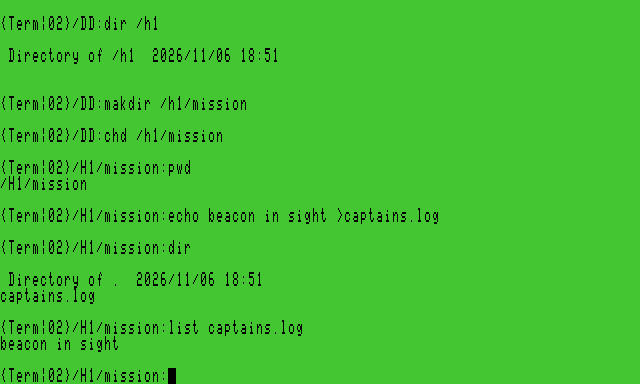
You have used several small programs together. One made a directory, one reported your location, one produced a line of text, and another read the file. The shell connected the text producer to a file through >. That ability to combine tools is one of the pleasures of an operating system.
If the log already exists
With this supplied shell, repeating the same echo … >captains.log reports ERROR #218 and leaves the existing file intact. Read it with list captains.log. To make a second log, choose a new filename. We will leave overwriting, appending and deleting for later lessons.
Make sure the Mac can keep it
OS-9 has finished its command when the prompt returns. VCC Plus also needs to save the changed image to its backing file on the Mac.
Open Media → Virtual Hard Disks… and inspect HD1. Your practice image should be writable and report Saves automatically. Expand Disk options if needed: Write protected and Temporary changes should both be off for this exercise. Let Saving automatically… finish before leaving the session.
If the row shows Temporary changes, your new bytes are being kept in memory. Use Save As… to retain a copy, or deliberately turn off Temporary changes to allow pending changes to save to the assigned file. If you used Save As…, update your personal profile’s HD1 file reference to the saved copy before reloading it. The saved profile still points to the earlier file until you update it. Save As retains the temporary-changes mode. If saving reports an error, resolve it before continuing.
There are now three places you can identify:
| Place | What belongs there |
|---|---|
| The current CoCo display | The commands and replies you just saw |
| /h1/mission/captains.log | The text file OS-9 created |
| The Mac image assigned to HD1 | The saved disk containing that filesystem and its files |
Write down the HD1 filename or keep the personal profile created for this practice session. Where is my work? explains what a profile remembers. The next chapter gives the file a stronger test: finding it after a fresh start.