
Chapter 4 of 7
Pick a planet
Two travelers run the same program. One gets a greeting from Earth and the other gets a greeting from Mars. Can you find the moment their trips take different paths?
Make two trips
Use the Disk BASIC session from chapter 3, with the starter disk in FD0, the first floppy drive. Loading the next program uses the RAM that held your beacon. Its two lines are in chapter 3 for when we need them again.
- Click the CoCo display, or choose Input → Focus CoCo Display (Option-Command-K). At
OK, typeLOAD"HELLO"and press Return. Wait forOK. - Type
RUNand press Return. The program asksWhat planet do you live on?and offers two choices. - Tap 3 by itself. The choices stay on screen. Now tap 1. Read the greeting on the blue strip. What will change if you take the second trip?
- At
OK, typeRUNand press Return again. This time tap 2. Read the greeting on the red strip.
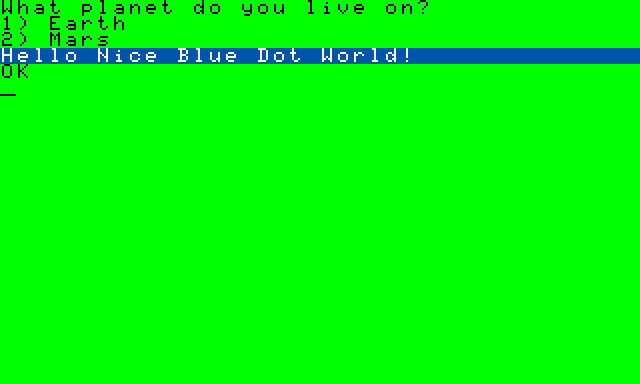
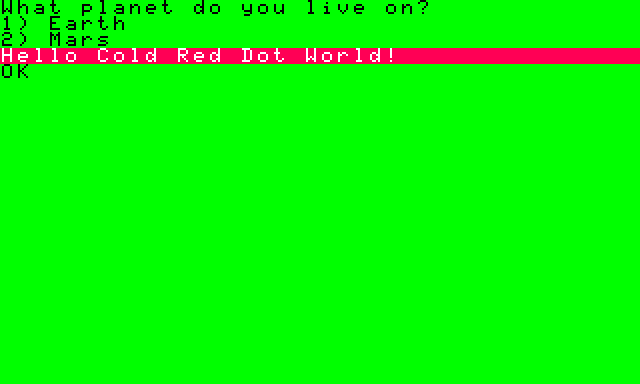
At the prompt, Return tells BASIC that your command is complete. During the planet question, the running program reads one key at a time. It can act on 1 or 2 the instant you press it.
Follow the choice in the listing
A listing is the set of instructions you can read and edit. In VCC Plus choose Develop → BASIC Development. The CoCo is at OK with the planet program still in RAM, so choose Read from CoCo. If you opened the lesson separately, click the planet listing in the Manual Library to work on an editable copy. In a web browser, save the file and use Open… in BASIC Development. In the editor, choose More file actions (the three dots) → Save As… and give your working copy a fresh name such as My Planet.bas.
Find line 60. INKEY$ checks the keyboard and K$ holds the character it found. The dollar sign marks a name that holds text. Line 70 asks whether that text is "1". If it is, BASIC jumps straight to line 110, the Earth greeting. If you pressed 3, neither planet matches and line 80 sends BASIC back to line 60 to check again. That's what it was doing while the screen seemed still.
Look up at line 20. WIDTH 40 gives the CoCo 3 room for 40 characters on a row, eight more than the 32 across the first screen you used. Each route chooses a color with PALETTE and puts a greeting in M$. Both routes meet at line 120. ATTR 3,6 selects the colors for the letters and their background, and PRINT M$ displays the chosen greeting.
Send a greeting of your own
Find line 110 in your Mac copy. Select only the words between its quotation marks and replace them with
Greetings from Earth!. Your whole line should now read like this.110 PALETTE 6,10:M$="Greetings from Earth!"Choose the editor's Save, then its Run. If it asks about replacing the BASIC program in CoCo memory, check that you're working in the practice session and confirm.
Press Option-Command-K to return to the display. Tap 1 at the planet question. Look for
Greetings from Earth!on the blue strip.
You changed the words while keeping the color choice. Where would you look for the words a visitor to Mars sees?
Find the Mars greeting
Line 90 pairs the Mars color with the words Hello Cold Red Dot World!. Both planets use the same PRINT on line 130.
For more on the display commands, see Tandy Corporation, Tandy Color Computer 3 BASIC Quick Reference Guide (1986), commands, pp. 2–17.