
Chapter 7 of 7
Give your friend the controls
You get to make the entrance quiz for the Moon Base crew. A friend gets the keyboard. Can the CoCo ask the questions, keep the score, and play your game again after a restart?
Make the first point count
Start in your Disk BASIC practice session with the Moon Base disk from chapter 5 in FD0. Finish the signal program so you can see OK. Click the CoCo display or press Option-Command-K. This time you'll build the game at the CoCo keyboard.
- Type
NEWand press Return to make room in RAM for the quiz. - Type these seven lines, pressing Return after each one. Use the digit zero in
S=0. Use straight double quotation marks around each piece of text.
10 CLS
20 S=0
30 PRINT "MOON BASE CREW QUIZ"
40 PRINT "WHICH PART SHOWS A MESSAGE?"
50 PRINT "1 SCREEN   2 KEYBOARD"
60 INPUT A
70 IF A=1 THEN S=S+1- Type
RUNand press Return. At the question mark, type 1 for SCREEN and press Return. This short version ends here and gives youOK. - At
OK, typePRINT Sand press Return. Look for 1. The program kept a point even though you hadn't yet written the line to display the score.
Line 60, INPUT A, waits for a number and Return, then stores the number under the name A. Line 70, IF A=1 THEN S=S+1, makes a decision. Read its first part as a question. “Is the answer in A equal to 1?” If it is, BASIC does the part after THEN. It takes the old score in S, adds one and stores the result back in S. A different answer skips that addition. The first equals sign compares. The second stores.
Add two more questions
Keep the first seven lines in RAM. At OK, enter the remaining lines below, one at a time. The higher line numbers put them after line 70. Line 110 awards a point for answer 2 because DISK is the second choice on that question.
80 PRINT "WHICH KEEPS A SAVED PROGRAM?"
90 PRINT "1 RAM   2 DISK"
100 INPUT A
110 IF A=2 THEN S=S+1
120 PRINT "WHAT DOES PRINT 2+3 SHOW?"
130 PRINT "1 FIVE   2 THE TEXT 2+3"
140 INPUT A
150 IF A=1 THEN S=S+1
160 PRINT "YOUR SCORE";S;"OUT OF 3"
170 END
Run the game twice. Each time, type RUN at OK and press Return. Give one number and Return per question. Try 1, 2, 1 on the first run. Try 2, 1, 2 on the second. Predict each final score.
Check the two scores
On the first run, look for YOUR SCORE 3 OUT OF 3. On the second, look for YOUR SCORE 0 OUT OF 3. Line 20 sets the score to zero at the start of every game. Each INPUT A replaces the previous answer, while S keeps the points earned so far. Line 160 prints the score.
If a score surprises you, type LIST at OK. Compare lines 70, 110 and 150 with the listing. Retype a whole numbered line to correct it, then run both tests again.
Open the complete runnable quiz
QUIZ.bas contains the entire original program. Click its name in the Manual Library to read the complete listing in its own editable window. In a web browser, save a copy and use Open… in BASIC Development.
10 CLS
20 S=0
30 PRINT "MOON BASE CREW QUIZ"
40 PRINT "WHICH PART SHOWS A MESSAGE?"
50 PRINT "1 SCREEN   2 KEYBOARD"
60 INPUT A
70 IF A=1 THEN S=S+1
80 PRINT "WHICH KEEPS A SAVED PROGRAM?"
90 PRINT "1 RAM   2 DISK"
100 INPUT A
110 IF A=2 THEN S=S+1
120 PRINT "WHAT DOES PRINT 2+3 SHOW?"
130 PRINT "1 FIVE   2 THE TEXT 2+3"
140 INPUT A
150 IF A=1 THEN S=S+1
160 PRINT "YOUR SCORE";S;"OUT OF 3"
170 END
Give the game a title and a home
At
OK, type this replacement line and press Return.30 PRINT "SPACE CADET QUIZ"Type
RUNand press Return. Look forSPACE CADET QUIZ, then answer all three questions to return toOK.In Media → Floppy Disks…, check the filename in FD0 against the practice disk you made. Check for Saves automatically. Press Option-Command-K to focus the CoCo, then type
DIRand press Return. On your chapter 5 disk you'll see HELLO and BEACON. If there's already a QUIZ you want to keep, make a fresh disk copy with FD0's Actions → Save As… before saving this version. If you made a copy, choose Run if paused, then press Option-Command-K.At
OK, typeSAVE"QUIZ"and press Return. Wait forOK. TypeDIR, press Return, and find the entry withQUIZandBAS.Check FD0 once more and wait for the disk save to finish. For a write-protection or save error, keep your game in RAM and follow the disk recovery steps before you restart.
Let someone play after a restart
- In the main VCC Plus window open Restart → Cold Restart — Clear RAM…. Now that your game is saved, confirm Cold Restart. This restarts the CoCo and clears its working memory.
- Check that your practice disk is still in FD0. If the machine is paused, choose the main window's Run. Return to the CoCo display and wait for
OK. - Type
LOAD"QUIZ"and press Return. Wait forOK, then typeRUNand press Return. Your new title should appear. - Move the book and listing out of sight. Give your friend the keyboard. Tell them, “Choose 1 or 2 and press Return for each answer.” Let the CoCo tell them their score.
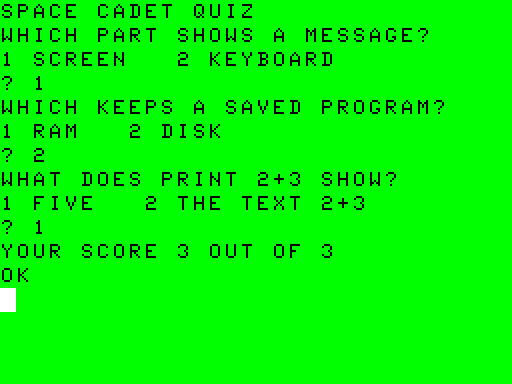
Ask your friend to pick one answer they gave. Can you tell its story? The keyboard supplied a number, INPUT put it in RAM, and the CPU followed your IF instruction to decide whether to add a point. The screen showed the total. And when the restart cleared RAM, your disk held the program, including the title you wrote.
If you want to write a question about your friend, keep this working game on the Moon Base disk. Make another practice copy, change one question and its choices, and decide which answer earns the point. Play it once each way to see whether your rule works.
For the language commands, see Tandy Corporation, Tandy Color Computer 3 BASIC Quick Reference Guide (1986), pp. 2–17. For saving and loading, see Color Computer Disk BASIC Quick Reference Guide (InterTAN Canada Ltd., 1987), pp. 3–8.