
Chapter 8 of 9
Choose a library for a job
A landing beacon needs a mark on the screen. A pilot needs a way to steer. A landing signal needs a sound. Try one of the small experiments on its own, or open the complete Mission Recorder project to see how the graphics, input, sound, storage and printer libraries work together on one CoCo.
Put the call and its library together
Start a fresh C Development → New → Hello World project for your experiment. Save the linked C example from this chapter and use its contents as that project's main.c. Keep your existing projects in their own folders.
Open Project Settings → Libraries → Add Library. Select the library named in the lesson. Set Append to linker variable to LIBS and leave Directory variable empty. Save your settings and choose Build, then Run. The Hello World Makefile already passes LIBS to the final compiler command. If you use a settings-generated Makefile instead, enter the library name under Linked libraries, one name per line.
The names on either side of this arrangement can differ. For the sound lab the header is Player.h and the library is bsound. A missing header stops compilation. An unresolved symbol such as _Player_sound usually means the declaration was found and the linker still needs the library implementing it. You can look up either name in Find a call.
Try the runtime with a cargo tag
Use message.c in a fresh Hello World copy. Skip Add Library for this experiment. All the calls come from the runtime header cmoc.h.
A cargo tag has room for four visible letters. Why does the source declare a five-byte array? strlen counts the letters. A C string also ends with a zero byte, so memcpy copies one byte more than that count. Before making the copy, setTag compares the length with the capacity supplied by the caller. Follow both requests. MARS fits. EARTH has five letters and needs six bytes. The refusal leaves the earlier tag untouched.
The guest reports TAG: MARS, LETTERS: 4, then EARTH TOO LONG. KEPT MARS. The second line depends on strcmp returning zero, C's result for two equal strings. The first uses %s for the terminated tag and %u for an unsigned count.
Draw a beacon you can measure
Choose Settings → Video Signal → RGB. Use beacon.c with bgraph. Run it and look for a white cross. Its middle is where two lines of ink meet. Press a key and the program goes back to text and prints BEACON CENTER: 3. How can a white spot be 3?
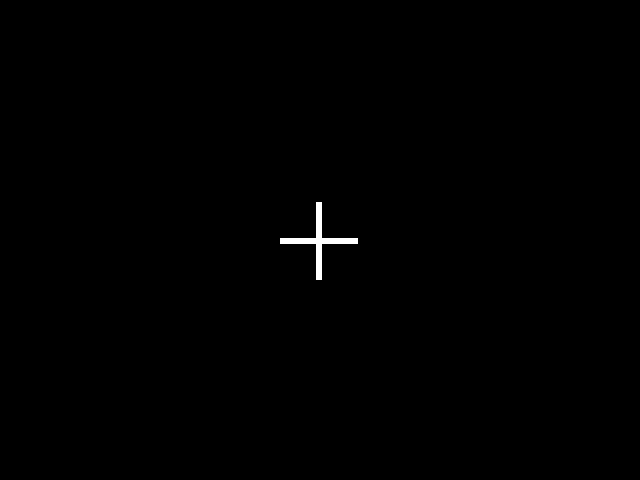
Open the source and find INK. The stamp holds palette slot numbers. The program assigns white to slot 3. In HSCREEN 2, each byte holds two four-bit pixels. A full 320-pixel row occupies 160 bytes. The program keeps just 13 rows in a static buffer, calls Primitive_setPixel320x16 to draw the cross and calls Primitive_getPixel320x16 to read each dot. Both functions expect the 160-byte stride even though our little stamp uses only its first 13 columns. Keep x and y inside the allocated area.
The buffer belongs to your C program. The displayed page belongs to the guest. The two inner loops use hset to copy each dot as a three-by-three square into the center of that page. Look back at the white cross. Its shape came from BGraph, its size from the copy loop and its brightness from the palette. A black screen can mean the program has already received its key or the foreground and background slots are the same. The last lines restore text mode and the two saved palette entries. Compare the BASIC star chart.
Catch the pilot's signal
Use stick.c with bcontrol. In Input → Keyboard and Joysticks…, choose Keyboard for the Right CoCo joystick, then choose Arrows under its key options. Remember the previous assignment so you can put it back. A physical controller assigned to the same port works too. See the port controls.
Run the program, give the CoCo display keyboard focus, and hold Left and Down together. Tap Z for fire while holding the direction keys. The program snapshots the right stick, reports RIGHT X=0 Y=63 at full travel and prints BUTTON DOWN. Release the controls before typing at BASIC. Run once more with the stick centered and your hands off. After about ten seconds it reports RIGHT X=31 Y=31 on a centered virtual stick and BUTTON UP. A physical controller may settle a little to either side of center.
Read the two masks in the source. The axis mask 0x03 requests axes 0 and 1. The button mask 1 tests right Fire 1. A set button bit means up. BASIC's timer gives the wait a deadline, so even someone with nothing assigned can finish the experiment. The joystick and sound share hardware. The program silences the analog multiplexer for polling and reconnects the sound input when finished.
If you always get the centered result, check the live input numbers on the right port card before editing the C program. Movement in the Mac controller preview proves only that the Mac sees the controller.
Fly a lander with two screen pages
There is a gold landing pad over the ridge. Can you bring both feet down on it? Use a CoCo 3 with at least 512 KiB in the Disk BASIC profile. Choose Settings → Video Signal → RGB to see the colors in the exercise. Save lander.c as the main.c in a fresh Hello World project. Add gime, bgraph and bcontrol to LIBS as described above. Choose Build, then Run.
Click the CoCo display and steer with A/D for left/right and W/S for up/down, or use a joystick assigned to the right CoCo port. The lander holds its position when you release the keys and center the stick. Move right until the entire craft is above the gold bar, then descend. ON THE PAD! means both feet made it. Q ends a flight early with FLIGHT ENDED. Either route returns to BASIC.
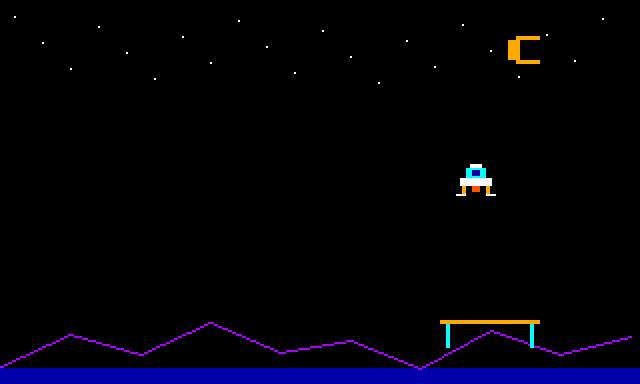
Follow one movement in main.c. While you see the lander at its last position, the GIME is reading the front page. The program erases the old craft and draws the new one on the back page. gime_present waits for a field boundary and swaps their jobs. The page you just saw will be the next one you draw on. Which position should you erase there? Look at previous[page]. Each page remembers the craft it last displayed.
The two pages each get their own stars, crescent and ridge during setup. BGraph's Primitive_line traces the ridge using the example’s pixel callback. After that, a frame needs only a 20-by-16-pixel erasure and the small rectangles that make up the new craft. The flight area stays clear of the stationary scenery, so painting the old position black restores the background. Try moving the crescent into the flight area and predict what would happen if you flew through it.
At 320 × 192 with two pixels per byte, one picture uses 30,720 bytes. The library reserves two 32 KiB physical pages, $40000 through $4FFFF. Keep that region free of other data. Use the normal BASIC text screen with interrupts enabled and keep the C program, its data and stack below $8000. Ordinary Hello World settings fit this exercise. Look up the page and memory requirements.
Launch a survey probe
How can one button fire a probe and charge the next one? Use probe.c as main.c in a fresh Hello World project. Add gime, input and bcontrol to LIBS in that order. Use Disk BASIC with at least 512 KiB of RAM and RGB video. Assign a controller to the right CoCo port, or select Keyboard → Arrows for that port in Input → Keyboard and Joysticks…. In the keyboard setup, Z is the primary fire button.
Choose Build, then Run, and click the CoCo display. Steer right until the middle of your craft is directly above the gold deposit. Center the stick. Press fire and keep it down. One short probe falls and disappears. While you hold the button, watch the gauge at the top left fill with gold. How many probes have you launched?
Release fire when the gauge is full. The gauge turns cyan. Press fire again and keep the craft still. This probe can reach the deposit, which turns cyan when surveyed. Press Q after it lands. If you made those two presses, BASIC shows PROBES LAUNCHED: 2 and DEPOSIT SURVEYED.
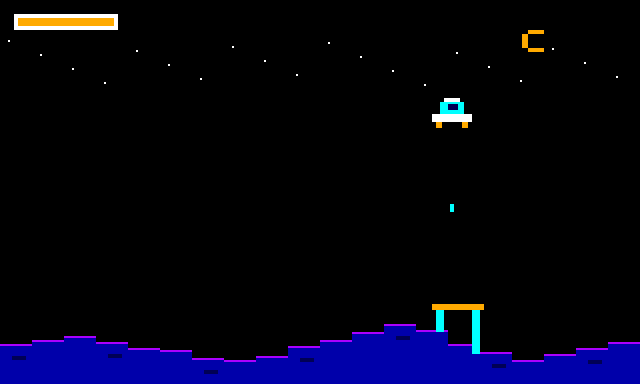
Find input_sample in the main loop. Each update takes one snapshot. stick.pressed & INPUT_PRIMARY starts a probe and adds one to the launch count. stick.held & INPUT_PRIMARY adds energy every update, up to a full gauge. stick.released & INPUT_PRIMARY saves that energy for the next launch. Try releasing early and compare how far your second probe travels.
Give the probe a second landscape
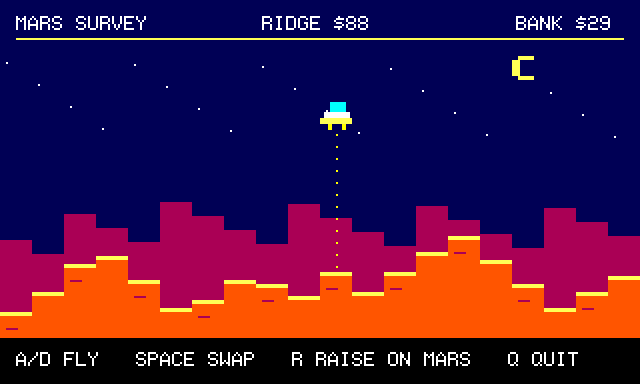
You have a probe, two planets and a question. If you raise a ridge on Mars, will it still be there after a trip home? Each planet gets its own patch of RAM. Your probe uses the same small C array to draw whichever landscape you visit.
Start a fresh Hello World project in C Development. Save ridge.c and use it as main.c. In Project Settings → Libraries, add bank, gime and hirestxt to LIBS. They supply the terrain storage, the graphics pages and the lettering. Use the Disk BASIC profile with at least 512 KiB and RGB video. Choose Build, then Run. Click the CoCo display to give the probe your keys.
- Start over Earth. Notice the ridge directly beneath the probe. A and D move the probe one column at a time. For this experiment, leave it at its starting column, 10.
- Tap Space to visit Mars. Press R once. Watch the ridge rise beneath the probe.
- Tap Space to revisit Earth. Did its ridge rise too? Tap Space again. The higher ridge is still on Mars. Q ends the flight and returns you to BASIC. A new run starts with the original landscapes.
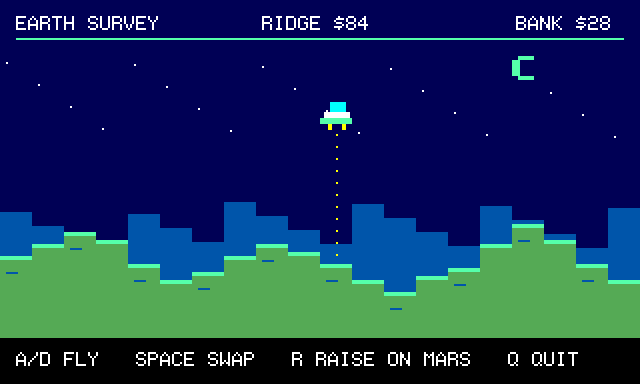
Where did Mars go while you were on Earth? A 6809 or 6309 running this program uses a 16-bit address. It can see 64 KiB at any instant, even on a 512 KiB CoCo 3. The memory management unit (MMU) divides that view into eight windows of 8 KiB each. A window can point to a different bank of physical RAM. Here the terrain library briefly borrows the window starting at $8000, copies the requested bytes, then puts the previous mapping back. Your ordinary C array keeps its usual address.
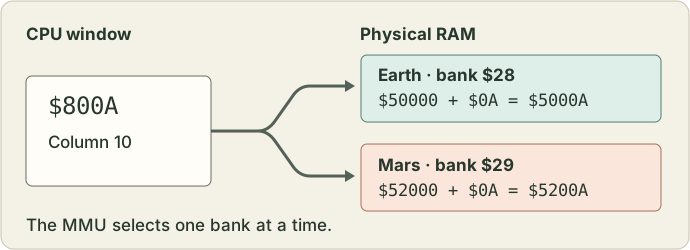
Follow column 10 through the source. Earth starts at offset zero in the reserved storage. Mars starts one bank later, at offset 8,192. Each terrain byte gives the vertical screen coordinate of a ridge top. On Mars the top of the screen reads RIDGE $98. That is 152 in decimal. Raising the ridge 16 pixels changes it to $88, or 136, because screen rows count down. bank_write saves the edited byte in Mars RAM. The next visit uses bank_read to retrieve the terrain. Try moving over one column before you raise the next ridge. Predict which byte will change.
            if (key == 'R' && onMars && ridge[column] >= 96) {
                /* Screen y grows downward. Save just the changed byte. */
                ridge[column] -= 16;
                if (!bank_write(offset + column, &ridge[column], 1))
                    return 0;
                break;
            }
Each map uses only 20 bytes. They could easily share one bank. Giving each a bank of its own makes the address change easy to see in the debugger.
See it in the debugger. Start a fresh flight, leave the probe at column 10, switch to Mars and raise the ridge once. Pause the emulator. In the debugger, choose Memory → Physical RAM. Enter 5200A and choose Go. Read column 0A in row 052000: 88 in hexadecimal is 136. Compare 5000A, the same column on Earth. It still reads 84, or 132. The debugger can see both banks while the guest is paused. Resume the emulator to finish your flight. Translate a CPU address in the hardware manual.
Hear a landing signal
Use tone.c with bsound. Set the app volume to a comfortable level. The text changes from BEACON ON to BEACON OFF with a short tone in between.
/* SPDX-License-Identifier: GPL-3.0-or-later */
/* Sound a landing signal and give the interrupt vector back. Link bsound. */
#include <Player.h>

int main(void)
{
    Player player;
    printf("BEACON ON\n");
    Player_init(&player, TRUE, NULL);
    Player_sound(130, 12);
    Player_shutdown();
    printf("BEACON OFF\n");
    return 0;
}
Player_init receives the address of a local Player. Its lifetime covers the whole signal. TRUE asks the library to install its own interrupt service. Sixty times per second the running guest signals a tick, allowing the player to finish a note. The first argument of Player_sound selects pitch on the CoCo SOUND scale. The second sets duration. Both take values from 1 through 255. This call uses 130 for pitch and 12 for duration, about four-fifths of a second. Keep guest interrupts enabled. Player_shutdown releases the interrupt hook before the local Player goes away.
Seeing both messages tells you control returned from the sound call. If both appear in silence, check the emulator's mute and the Mac output volume. Seeing only the first while the emulator is paused calls for the emulator’s Run button.
Fly the Talking Planet Lander
In C Development, choose New → Talking Planet Lander. You can also save the project, expand it, and open the folder containing its Makefile. The program uses the same two destinations as Earth or Mars. This time the craft sends the beacon to your speakers and speaks its destination.
Start the Disk BASIC profile. Open Cartridges, enable the Multi-Pak, put Speech/Sound in slot 1 and Orchestra-90 in slot 2. Keep the floppy controller in startup slot 4. Speech/Sound needs its PIC and speech firmware. The stereo beacon works with Orchestra-90 in sound-only mode. Use normal guest CPU speed.
Choose Build and Run. Give the emulator keyboard focus and press 1 or 2. Look for DESTINATION EARTH or DESTINATION MARS. Listen for the low note on the left and the higher one on the right. Press either CoCo joystick’s primary fire button during an announcement. The screen prints THRUST once per press. Both routes finish at TOUCHDOWN. A disk you create with Build Disk can be mounted in FD0 and started with LOADM"LANDER":EXEC.
Open main.c and follow three calls:
- snprintf places the destination in a 24-byte array. Its capacity includes the final zero byte. When a future message might outgrow the array, check the return value. A negative result signals an error. A result of 24 or more means only the prefix fit.
- orch90_play sends a block of left/right sample pairs to the stereo converter. It occupies the guest CPU until that block finishes. The two pitches come from how often the sample values alternate. Each quiet channel stays at 128.
- ssc_service feeds one byte of a phrase when the cartridge is ready. Between calls, the program checks the fire buttons. After the final byte, it watches the speech-idle flag for the start and finish of playback, with a timer deadline. You can see why finishing the transfer and finishing the announcement are two different events.
The template already selects vcccompat, orch90, ssc and bcontrol under Project Settings → Libraries. Use the same selections for another project that needs all four.
Give a planet its own voice
Your crew has named a new planet Zora. How do you tell a speech synthesizer what a made-up name sounds like? You can build the name out of allophones, the short speech sounds the cartridge can play, and keep a separate English message for the crew.
- Start the Disk BASIC profile. Under Cartridges, enable the Multi-Pak and put Speech/Sound in slot 1. Supply its PIC and speech firmware if prompted. Keep the floppy controller in startup slot 4. Open Input → Keyboard and Joysticks and assign your controller to the right CoCo port. With just a keyboard, choose Keyboard → Arrows for that port and use Z for fire. Make a note of your original assignment so you can restore it afterward.
- Save announcer.c as main.c in a fresh Hello World project. Select ssc, input and bcontrol under Project Settings → Libraries. If you maintain the Makefile yourself, put these three in its library list in that order.
- Choose Build, then Run. Click the guest display and press 1 to hear the name. Press the right joystick’s primary fire button while the voice plays. Listen for a landing tone that starts strong and fades. Hold the button down. The landing count goes up only once. Release it, let the tone finish, and press again for a second landing.
- Press 2 for the crew message. Once it finishes, press 2 again. The cartridge can speak the message again without receiving its spelling a second time. Press Q when you’re ready to return to BASIC.
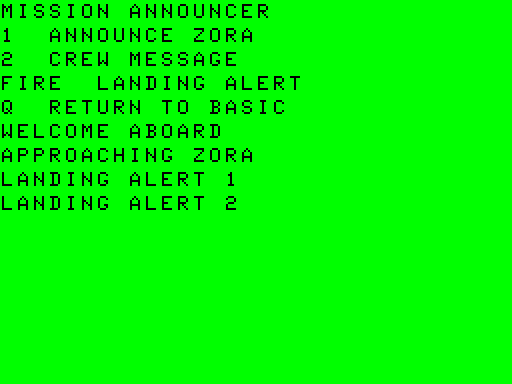
Look at the three calls near the start of the program. ssc_store_allophones puts ZZ, OR and AX in speech slot 1. Say the sounds slowly yourself. The AX gives the final syllable its soft “uh.” ssc_store_phrase puts the English spelling of WELCOME ABOARD in speech slot 3. Both slots belong to the same voice, so let a spoken line finish before asking for another.
ssc_store_enveloped_tone prepares a separate sound slot. 420 sets the pitch period, SSC_ENV_DECAY shapes the volume, and 1800 sets how slowly that shape unfolds. The cartridge plays the sound while the main loop reads keys. The program samples the joystick once per guest timer tick because a joystick reading briefly borrows the audio circuit. Try a larger envelope period and listen for a slower fade. The duration of 18 sets when the cartridge silences the channel.
The play calls return SSC_OK when the command has been submitted. That is why APPROACHING ZORA can appear while you are still hearing the name. The program restores the previous audio route when you quit. If the cartridge times out during a command, it resets the cartridge before returning, which also clears its stored sounds.
For the original cartridge commands and allophone chart, see the Tandy Speech/Sound manual in the bibliography.
Steer while a stereo beacon plays
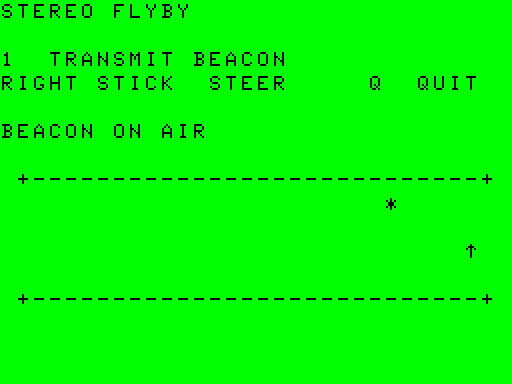
Imagine flying past a navigation buoy. You hear a low note on your left, a short gap, then a higher note on your right. If your program had to sit in orch90_play for the whole signal, who would steer the ship?
- Start the Disk BASIC profile at its normal guest clock. Under Cartridges, enable the Multi-Pak, place Orchestra-90 in an empty slot and keep the floppy controller in startup slot 4. Sound-only Orchestra-90 works here. In Input → Keyboard and Joysticks, assign a controller to the right CoCo port, or choose its keyboard controls and steer with the left and right arrows.
- In a fresh C Hello World project, replace main.c with flyby.c. Under Project Settings → Libraries, add orch90, input and bcontrol, in that order. Build, run and click the guest display.
- Find the ship (the up arrow) below the moving star (*). Press 1 to transmit. Watch the star keep moving as you steer the ship from side to side. Listen for the second note in your right speaker or headphone. Press Q mid-note. The signal stops and FLYBY COMPLETE appears before BASIC returns.
    for (i = 0; i < FRAMES; ++i) {
        /* The first note comes from the left. The right note is an octave up.
           128 in both channels is the quiet space between notes. */
        beacon[i].left = i < 768 ? wave[i & 15] : 128;
        beacon[i].right = i >= 1024 && i < 1792 ? wave[(i << 1) & 15] : 128;
    }
Each entry in beacon holds one unsigned byte for the left channel and one for the right. The 2,048 frames occupy 4,096 bytes of guest RAM. The middle value, 128, gives each wave room to swing up or down. Read makeBeacon and find which channel sits at 128 during the first note. The right note walks through the same little wave table two places at a time, so you hear it an octave higher. In the running exercise the left speaker played about 243 cycles per second and the right played about 485 while the pilot steered. Look for the quiet gap after each note. How many of the 2,048 stereo frames does this loop reserve for the two gaps? Count from 768 to just before 1,024, then from 1,792 to the end.
orch90_start leaves the sample in place and returns to the flight loop. Short interrupts feed the next stereo pair to the cartridge. That is why beacon lives in a static array. The loop has time to poll the stick and draw a new star position every four BASIC clock ticks. Keep the array mapped and unchanged until orch90_stop returns or a one-shot has finished. End playback before returning to BASIC. The background player needs the standard BASIC interrupt setup. If you adapt another exercise that uses a BSound player, shut that player down before you start the beacon.
Read the Descent Computer
Your lander’s radar reports 105.50 metres. Two seconds later it reports 101.75 metres. How fast are you falling? The pilot wants a short, readable instrument panel. The computer needs the full speed for its next calculation.
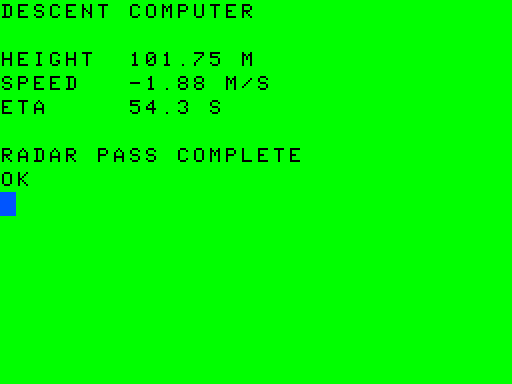
Start with the Disk BASIC profile and a fresh C Hello World project. Save descent.c as main.c and add vcccompat under Project Settings → Libraries. Use the default CoCo BASIC floating-point backend. Build and run. The program reads its two simulated radar heights, prints one panel and returns to BASIC.
    /* Falling gives a negative speed. Keep the full value for the estimate. */
    speed = (lastHeight - firstHeight) / seconds;
    reading("HEIGHT  ", lastHeight, 2, "M");
    reading("SPEED   ", speed, 2, "M/S");
    if (speed < 0.0f)
        reading("ETA     ", lastHeight / -speed, 1, "S");
    else
        printf("ETA     NO DESCENT\n");
Subtract the earlier height from the later one. The change is −3.75 metres in two seconds, so the vertical speed is −1.875 metres per second. The minus sign means the lander is getting closer to the surface. The panel rounds that reading to −1.88. The landing estimate still uses the original speed. At that steady rate, covering the remaining 101.75 metres would take about 54.3 seconds. If the two heights are equal, the craft is hovering. The program then prints NO DESCENT in the ETA field and skips the division.
    char field[12];
    int length = vcc_fixed(field, sizeof(field), value, places);
    if (length < 0 || (unsigned)length >= sizeof(field))
        printf("%s--- %s\n", label, unit);
    else
        printf("%s%s %s\n", label, field, unit);
vcc_fixed writes the number into field. Its return value tells you how many characters the whole number needs, excluding the final zero byte. The text 101.75 needs six characters and a seventh byte to mark the end. If the whole number will not fit, the instrument prints three dashes. A truncated speed could give a pilot the wrong idea.
Try making field five bytes long. Predict which of the three readings survives. The rounded speed −1.88 takes five characters before its terminator. The ETA 54.3 takes four. Restore the original size when you finish.
Make room for one more crew member
Your ship has two empty seats and expects a third passenger. How can a program grow its seat list on a CoCo? Save crew.c as the main.c of a fresh Hello World project. Under Project Settings → Libraries, add vcccompat, then wydealloc. For the Hello World Makefile, append both to LIBS. Choose Build, then Run.
Find storage[96]. Those 96 bytes are the entire heap budget, including the space the allocator uses to keep track of each block. The array is static, so its address stays valid for the life of the program. The call to vcc_heap_init hands this region to the allocator. Leave the array alone once you've handed it over. The compiler's stack setting still needs room for local variables and function calls.
calloc supplies two zeroed seats. After the program fills them, realloc asks for room for a third. Notice the second pointer, larger. The program assigns it to seats only after it knows the request succeeded. It then writes the new seat before reading it.
The guest prints CREW AT LAUNCH: 0 and CREW AFTER GROWTH: 3. Predict the next two lines. The program asks for 200 bytes. The entire heap has only 96! The guest says NO ROOM FOR 200, then CREW STILL ABOARD: 3. The original three entries survived the failed request. free gives their space back, and CREW LOG CLOSED appears before BASIC returns.
For a list that grows with outside input, check every allocation this way. Even when the total free bytes look sufficient, one request needs a single contiguous block. During growth the old and new blocks may need to fit at the same time. The pool.c exercise uses Pierre Sarrazin's WydeAlloc directly if you want to manage several separate pools.
Five more experiments
Use the same private-project steps for any of these. Each example needs just the library in its row. The files contain the initialization and cleanup as well as the call doing the interesting work.
| Try this file | Library and header | What to look for |
|---|---|---|
| pool.c | wydealloc, wydealloc.h |
Our own 64-byte storage pool has room for an eight-byte block. An 80-byte request returns a null pointer. The screen says SMALL OK, LARGE REFUSED and AFTER FREE: OK. Follow which pointer we release before asking for eight bytes again. |
| glyph.c | hirestxt, hirestxt.h |
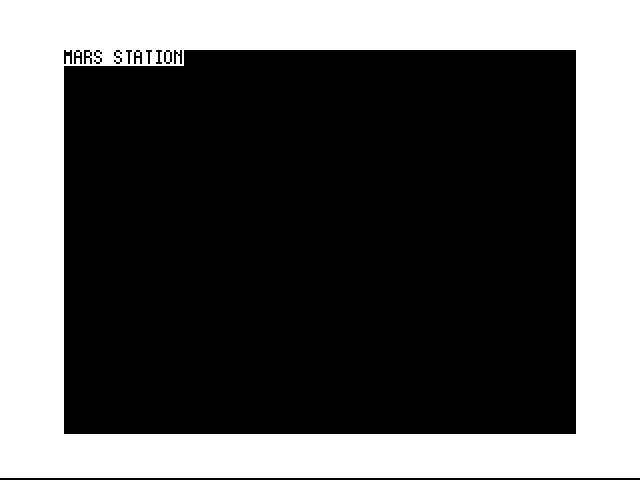
Read MARS STATION on a graphics screen. Press a key to return to hardware text. The letters are pixels written into the PMODE 4 buffer. Use a fresh Disk BASIC setup with its standard four graphics pages reserved and the normal project load address. |
| route.c | astar, astar.h |
The rooms sit in a row. The last room is the goal. After astar_searchGrid finds it, the iterator reports BACK FROM GOAL: 2 1 0. Reverse that order if you want directions for the outward journey. |
| deal.c | cardgame, cardgame.h |
Three numbered cards start in a known order. pickCardFromDeck removes the card at the end and updates the count through its address. Expect DREW 3, 2 LEFT. The small example never needs a card bitmap. |
| editlog.c | ebitor, Ebitor.h and sg4term.h |
Two simulated keys add O and K to a 32-byte edit buffer. Moving the cursor left commits the inserted run to that buffer. The final report is LOG: OK. Compare the guest's editing buffer with the C source open on the Mac. |
A header tells you what you may call. The host library settings tell the build where to find the implementation. The machine still has a say in what you see. Check the screen mode, the controller assignment or the sound level before changing a working algorithm.
Fly the Mission Recorder
Your survey ship flies over sixteen sectors. Mark one from the cockpit, fly on and file a report. Which sector will Mission Control receive after you fly away from your mark?
- Start Disk BASIC with 512 KiB of RAM, normal guest speed and RGB video. Keep the FD-502 in Multi-Pak startup slot 4. Mount an initialized, writable practice disk in FD0. You can save a blank practice disk from the offline library. Open Media → Printer Output… and choose Start Capture to keep the printed record.
- Save the complete Mission Recorder project. Expand the ZIP in Finder. Under Develop → C Development…, choose Open, select the MissionRecorder folder containing the Makefile, then choose Build and Run. The workbench loads the binary into the CoCo. Your practice disk stays in FD0 to receive the report.
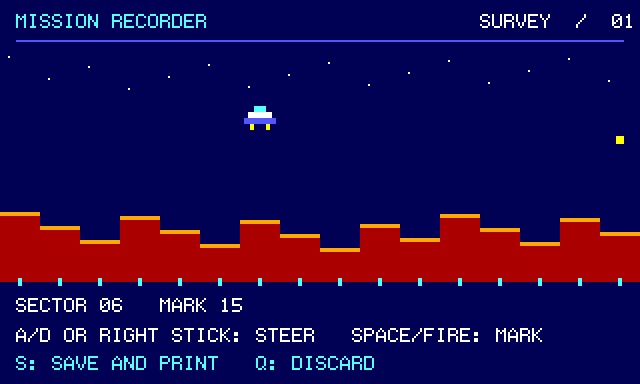
- Click the guest display. Choose 1 for a silent flight. Watch for the ship above the ridge in sector 07. When it appears, both screen pages are ready and you can steer. Tap D to move right until the readout reaches 15, or steer there with the right CoCo joystick. Press Space or the stick’s primary fire button to mark the sector. A gold marker appears. Move left with A or the stick. Watch SECTOR follow the ship while MARK stays at 15. Press S to finish and save. Q instead discards the flight, including an unsaved mark.
- The first report on the blank practice disk is LOG01.TXT. Look in Printer Output for two lines, MISSION RECORDER and SECTOR 15. The ship moved after you marked the sector, yet the printer still reports 15. Back at BASIC, type DIR 0 to find the disk file. Choose Run in the workbench to fly again. A second save on the same disk gets a new filename.
Take the program on disk. Choose Build Disk and Show Build Products. Copy RECORDER.dsk to your own folder, mount the copy in FD0 and type LOADM"RECORDER":EXEC in BASIC. The copy holds your reports beside the program and survives a rebuild. To keep a separate copy of the printed lines on the Mac, use Save Text… in Printer Output.
Follow the observation through the source. Open flight.c to find the mark, report.c to find the disk write, and main.c to see when each runs. The pilot’s first mark stores a sector number in banked RAM. Steering and redrawing the cockpit can now continue without changing that observation. The save routine writes a temporary file, closes it and reads it back. If every byte matches and the file ends there, it renames the draft from LOG01.TMP to LOG01.TXT and sends the same two lines to the printer. If either name already exists, the recorder tries the next number, up to 99. An older report or a draft left by an interrupted save therefore keeps its name and contents. If the disk is write-protected, leave the guest at the retry prompt, remove write protection from the practice disk and press R. The original mark survives the retry. The printer receives nothing from a failed save.
Add sound for a second flight. In Cartridges, place Speech/Sound in Multi-Pak slot 1 and Orchestra-90 in slot 2. Supply the two Speech/Sound firmware files if prompted. Orchestra-90 can run in sound-only mode. Pick 2 for speech, 3 for stereo or 4 for both. The choice tells your program which cartridges are available. With just the disk controller, choose 1. On a stereo flight, the left and right channels take turns sounding a beacon. On a speech flight, marking the sector announces “mark recorded.” The flight loop offers the cartridge one byte at a time, so it can still respond to your stick while the announcement is being sent.
Find beacon at the top of flight.c. Its 32 stereo frames occupy 64 bytes, one byte per channel per frame. The foreground loop steers the ship and draws the screen while the Orchestra-90 player borrows BASIC’s interrupt handler to feed the next frame. Keep that array in ordinary mapped memory and leave interrupts enabled during flight. Before disk or printer I/O, the program stops the player, restores the speech route if it used it, and returns BASIC’s palette and memory mapping. Stereo Flyby isolates the beacon technique.
Know which RAM belongs to whom. The graphics library reserves 64 KiB for the two screen pages in physical banks $20–$27. The bank library reserves the next 32 KiB ($28–$2B). This flight writes just one byte at offset zero of that second area. The survey paints the ridge once on each screen page. Each page remembers where its own ship and marker were drawn. On the next turn the pilot only has to redraw the changed parts. Neither screen can overwrite the mark in its separate bank. The banked terrain exercise shows how the processor can reach that byte even while the display controller reads a different page. After a restart you can read the report from your practice disk.
How much room to add an instrument? The link map counts code and static data, including space for initially empty buffers. In the supplied project the Debug build occupies 22,513 bytes from $2000 up to $77F1 (the first unused address). Release occupies 21,775 bytes, up to $750F. That leaves just 15 and 753 bytes respectively before the project’s $7800 link limit. The project budgets a separate 2 KiB for the stack. Even adding a message can push Debug over its link limit. If that happens, try Release or remove an optional feature before changing the memory layout. Keep a large terrain table in the reserved banked area and copy a small piece at a time. Rebuild and look at RECORDER.map to measure your own version.