
Chapter 5 of 9
Build a disk from a folder
Open a brand-new Hello Disk project. The guest will display five words. Only the headings live in the C files you first see. To find the five words, follow the build backward from the floppy to the Mac.
Meet the crew
Choose Develop → C Development… → New → Hello Disk. Give the project its own writable folder. In the editor's file list, open each of these files in turn.
| File on the Mac | Its job | Where its contribution ends up |
|---|---|---|
main.c |
Starts CoCo support, asks for the heading and the words, prints the result. | Instructions in HELLO.BIN |
src/display.c |
Prints the two fixed headings. | Instructions and text in HELLO.BIN |
src/disk.c |
Opens the guest file and prints the text it reads. | Instructions and a reserved buffer in the running program |
include/hello.h |
Declares the two functions and the shared count, so each C file knows their types. | The compiler checks the callers against these declarations. |
assets/words.txt |
Holds the five editable words, one per line. | Supplies both the compiled count and the disk data |
tools/build-data.pl |
Reads that list on the Mac and produces two files. | Generated C source and a 256-byte WORDS.DAT |
Here is the whole conductor's score, from the installed template.
/* SPDX-License-Identifier: GPL-3.0-or-later */
#include <cmoc.h>
#include <coco.h>
#include "hello.h"

int main(void)
{
    unsigned char status;
    initCoCoSupport();
    setHighSpeed(FALSE);
    showHeading();
    status = showDiskWords();
    printf("DISK RESULT: %u\n", status);
    printf("GENERATED WORD COUNT: %u\n", generatedWordCount);
    return status;
}
Read the last two print calls aloud. One number comes back from a function at run time. The other was counted when you built the program. They can tell different stories.
Follow the arrows back to their inputs
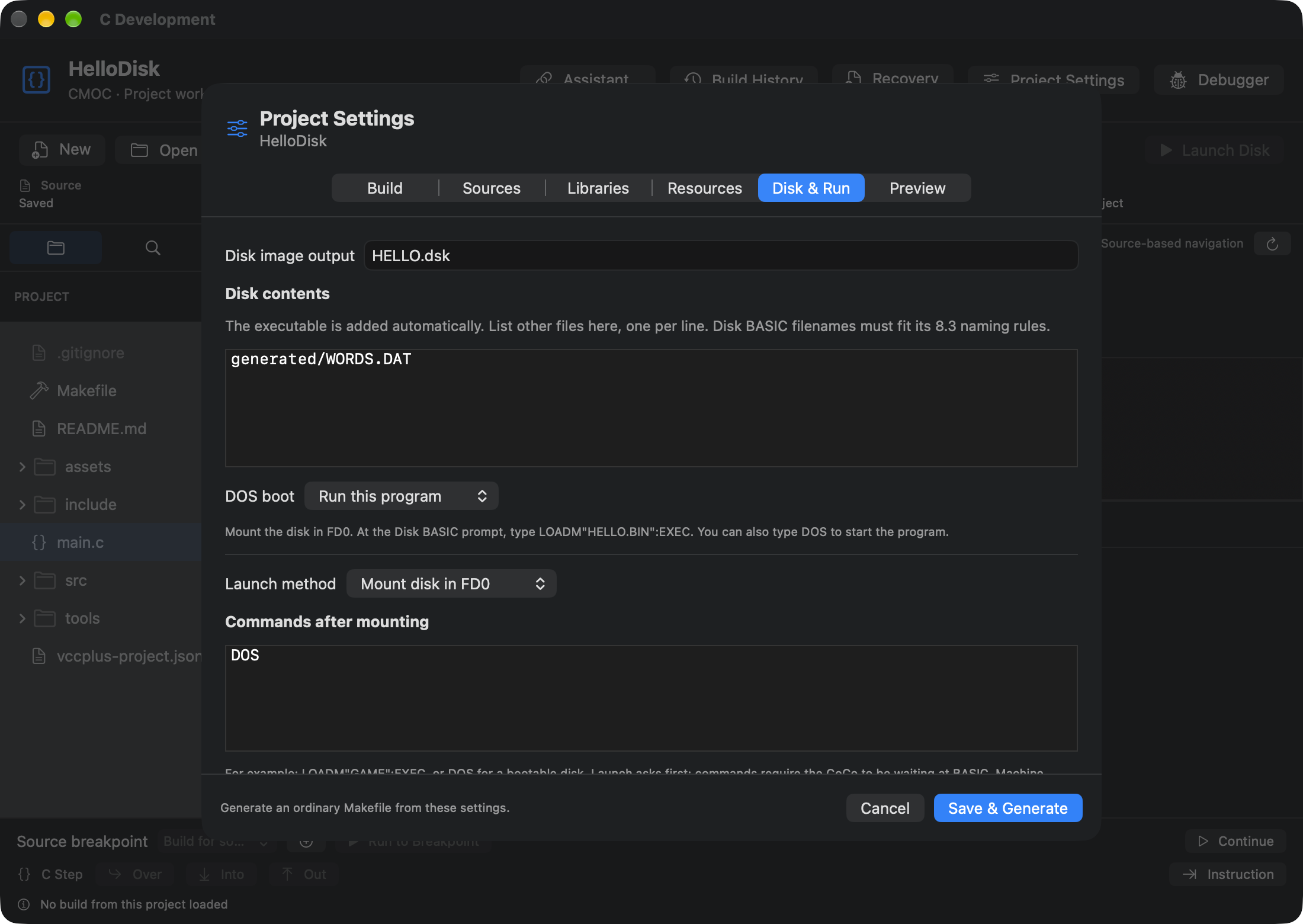
Open Project Settings → Preview or read the project's Makefile. Find the rule starting with HELLO.dsk:. The name on the left is a target, something Make knows how to produce. The items on the right must be ready first. The indented lines beneath it are the recipe. Here is the route to take through this particular file:
- To make HELLO.dsk, the recipe creates a fresh image, installs a small DOS loader, and puts HELLO.bin and generated/WORDS.DAT in its directory.
- To make HELLO.bin, the linker joins four compiled pieces and resolves the disk calls using decbfile. Three pieces correspond to the handwritten C files. The fourth comes from generated/word-count.c.
- The grouped rule for generated/word-count.c and generated/WORDS.DAT runs once to create both from the same word list. Open Resources to see the inputs, outputs and Perl command. One output will become part of the program. The other travels beside it.
- To change the cargo, edit assets/words.txt. An edit inside a generated file can disappear on the very next build.
A header is useful here for a different reason than a library. The declaration in hello.h tells the compiler how to call showDiskWords. The object built from disk.c supplies that function to the linker. Likewise, decbfile.h declares the disk calls and the library archive supplies their implementations.
Pick the button that performs your experiment
Start a Disk BASIC session with the FD-502 available. Save work in the guest before launching a different program.
| Action | What happens with these projects |
|---|---|
| Build | Runs the configured build target on the Mac. Hello Disk specifies disk, so this builds its image as well as its binary. Hello World normally builds a binary. |
| Build Disk | Requests the configured disk target explicitly. In the supplied Hello Disk project it is also disk. |
| Run | With binary launch selected, the workbench loads the executable into the CoCo and enters it directly. Earth or Mars needs only this. |
| Launch Disk | With disk launch selected, the workbench uses the built image, asks about replacing FD0 as needed, and sends the project's BASIC launch command. Hello Disk uses DOS. |
Choose Build Disk. Read the last successful target in the build output. Choose it a second time without editing anything. Make can report that the target is already up to date. Rebuild is useful when you specifically want fresh compilation. Show Build Products takes you to the result on the Mac. The app builds in its own work area, so looking for a newly written HELLO.dsk among your handwritten sources can send you on a wild-goose chase.
Next choose Launch Disk. Attend to any floppy-replacement prompt. On the guest you should see five words and two numbers. Keep the disk and project open for a trip through the sector reader.