
Chapter 4 of 5
How does it find its way back?
Put a finger on this sentence, glance at the next heading, then come back to your finger. You just kept your place through a detour. The CoCo has to do that every time one piece of a program asks another to do a job. In this experiment you can read the two bytes it uses to keep its place.
Write down the address you expect
Save return.asm and open your copy with File → Open Source… in Assembly Development. Start from Disk BASIC with the MC6809 target. Clear any stops in this document. Look at the caller and helper together.
            org     $3f00
start       lda     #'A         ; Begin with the letter A ($41).
call        jsr     nextletter  ; Save the address of 'display' on the S stack.
display     jsr     [CHROUT]    ; The subroutine has left the new letter in A.
            lda     #CR
            jsr     [CHROUT]
            rts                 ; Finish the main program and return to BASIC.

nextletter  inca                ; ASCII B follows ASCII A.
back        rts                 ; Retrieve the saved address and resume at display.
            end     start
The caller puts the code for the letter A in register A. The helper, nextletter, adds one. The agreement between these two pieces of code is simple: the caller puts a character code in A and the helper leaves the next code there. Both pieces can read and change that same register.
Choose Debug from Entry and confirm. Step once. The footer should now read PC $3F02 · A $41. Open Build details → Listing. Find the JSR instruction at call. It occupies three bytes starting at $3F02. The instruction marked display starts immediately afterward. Which address will the processor need when the helper has done its job? Write it down before stepping.
Read what the call saved
Open Debugger → Inspector from the workspace. Read S, the system stack pointer. The stack is a region of RAM the processor uses to keep things it will need back, most recently saved first. S gives the address at its top. Keep the Inspector handy and use Step in Assembly Development.
| When you look | Where PC points | What to check |
|---|---|---|
| Before JSR | call, $3F02 | Write down S. A contains $41. |
| After one Step | nextletter, $3F10 | A still holds $41. S is two less than the value you wrote down. |
| After the next Step | back, $3F11 | INCA has produced $42. The helper’s RTS is next. |
| After stepping that RTS | display, $3F05 | S is back to its starting value. A still holds $42. |
Pause on the second row before going further. In the Inspector’s lower Memory pane, choose Mapped CPU. In Address enter the current S in hexadecimal and choose Go. The debugger displays memory in rows of sixteen bytes. For S=$7F33, find row 7F30, column 03, then move one column right to 04. For another S, use its last hexadecimal digit to find the column in the same way. With this source you will find 3F 05. Together they spell $3F05, the address of display. The CPU first made room for two bytes by moving down the stack. Those two bytes can describe any address in its 16-bit address space.
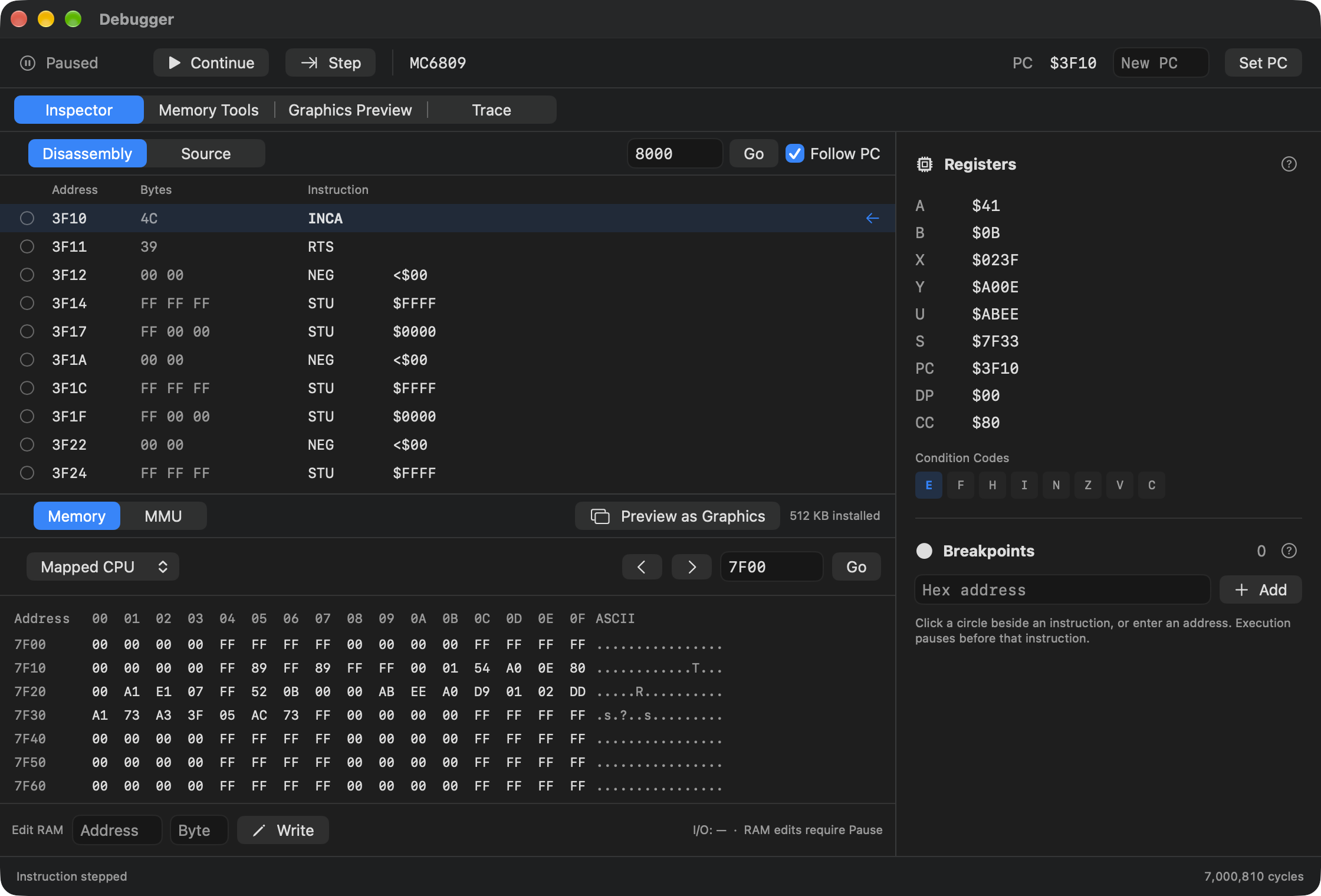
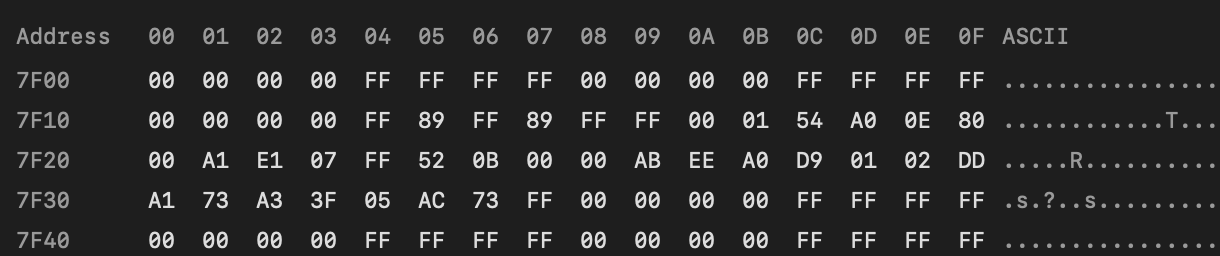
If your S differs from the figure, use the value on your own machine. The difference of two and the contents at that address tell you what JSR did. Inspect the bytes without writing to them. The processor will soon rely on their contents.
One return to the caller, one return to BASIC
Finish the last two steps in the table. At display, the helper has returned its answer in register A. The CoCo has yet to print the letter. Choose Continue. The call through CHROUT hands $42 to the ROM, which prints B. The following carriage return starts a fresh line. Finally the main routine reaches its own RTS and BASIC displays OK.
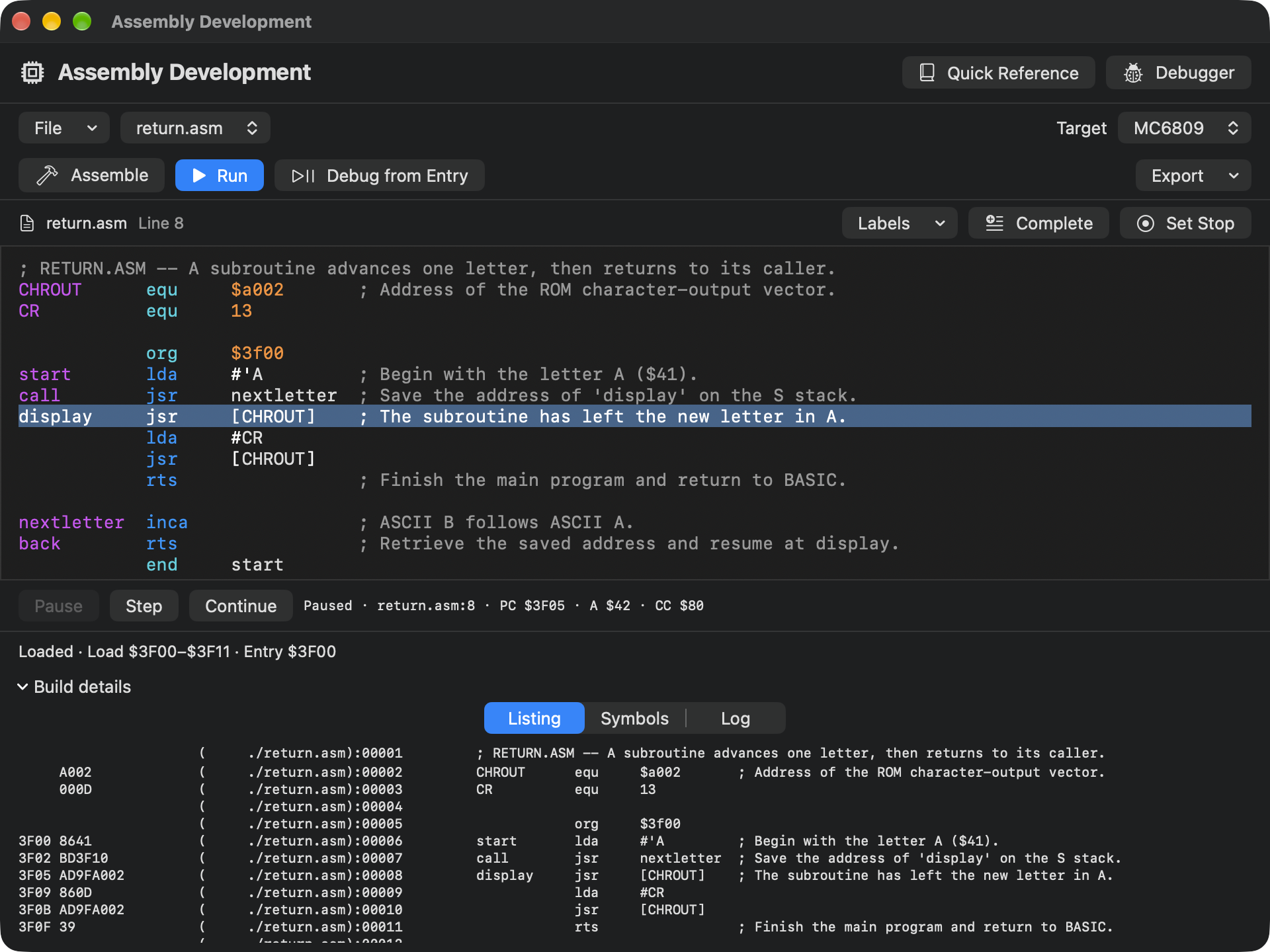
Now find the two RTS instructions again. At back, the top of the stack holds the address the JSR at call saved. At the main routine’s final RTS, the helper’s address has already been used. The BASIC-hosted launch supplied a caller for the whole program. The same one-byte instruction can therefore take you to two entirely different places. The top of the stack decides where you go.
If you've used the C call stack, you have seen a caller named for you in its own window. Here you found the caller’s next instruction using only a listing, S, and two bytes of RAM. Next, you can use that same idea when Earth or Mars asks a helper to print a whole string.