
Chapter 1 of 5
Where does one byte go?
The CoCo is about to add one to 41. You can do the arithmetic in your head. Can you catch the instant the answer appears inside the machine? Our first program has just three instructions. You get to let them run one at a time.
Put the program on the workbench
- Start with the Disk BASIC profile at the OK prompt. Save any guest program you want to keep. The exercise loads machine instructions into the CoCo’s RAM.
- Save byte.asm in a practice folder on your Mac. The file holds the words the programmer wrote. Choose Develop → Assembly Development…. Inside that window, choose File → Open Source… and open your saved file. Check that the document picker shows byte.asm. Your other open sources are available in the same picker.
- Select the MC6809 target and click Assemble. The assembler translates the words into bytes the processor can execute. Open Build details → Listing to see the words and bytes side by side. You can assemble a program while the CoCo is still sitting at its prompt.
- Choose Debug from Entry. Confirm the load when asked. The CoCo now has your program and is paused at its first instruction. The footer should show PC $3F00. PC is the program counter. Its value is the address where the processor will fetch its next instruction.
            org     $3f00
start       lda     #$29        ; Load the number $29 (decimal 41) into A.
            inca                ; Add one. What will A hold after this step?
done        rts                 ; Return to BASIC with the result still in A.
            end     start
Read the left column as names for places. The label start names the address of the load. The label done names the address of the return. ORG tells the assembler where the program belongs, and END start tells it which label supplies the entry address. The three lines between them are the three instructions you will execute. Everything to the right of a semicolon is a note for the human reader.
Follow a byte through A
A is an accumulator, a small storage place inside the processor. It holds one byte, eight bits. In the first instruction, LDA means “load accumulator A.” The # tells the assembler that the number following it is the value to load. The $ tells it how to read the digits. In hexadecimal, each place counts sixteen of the place to its right. So $29 is two sixteens plus nine, or 41.
Click Step once. Read both PC and A in the footer. PC has moved to $3F02 and A holds $29. Why did PC move by two? Find 86 29 in the listing. The first byte says which operation to perform. The second supplies its value. The processor has finished with both.
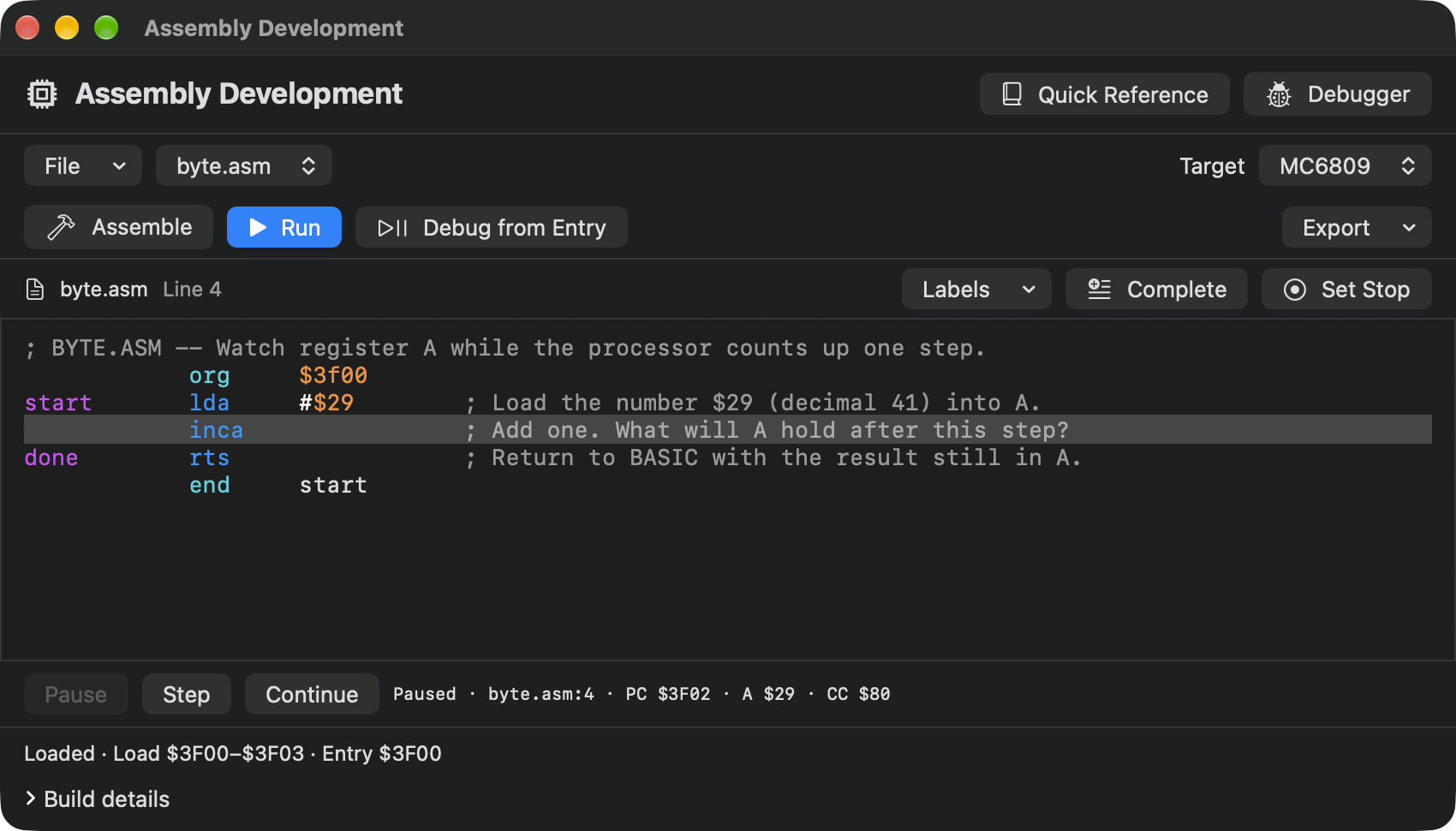
The highlight is now on INCA, “increment A.” Write down what you expect A to show after the next step. The digits in hexadecimal continue from 9 through A, B, C, D, E and F. What comes immediately after $29?
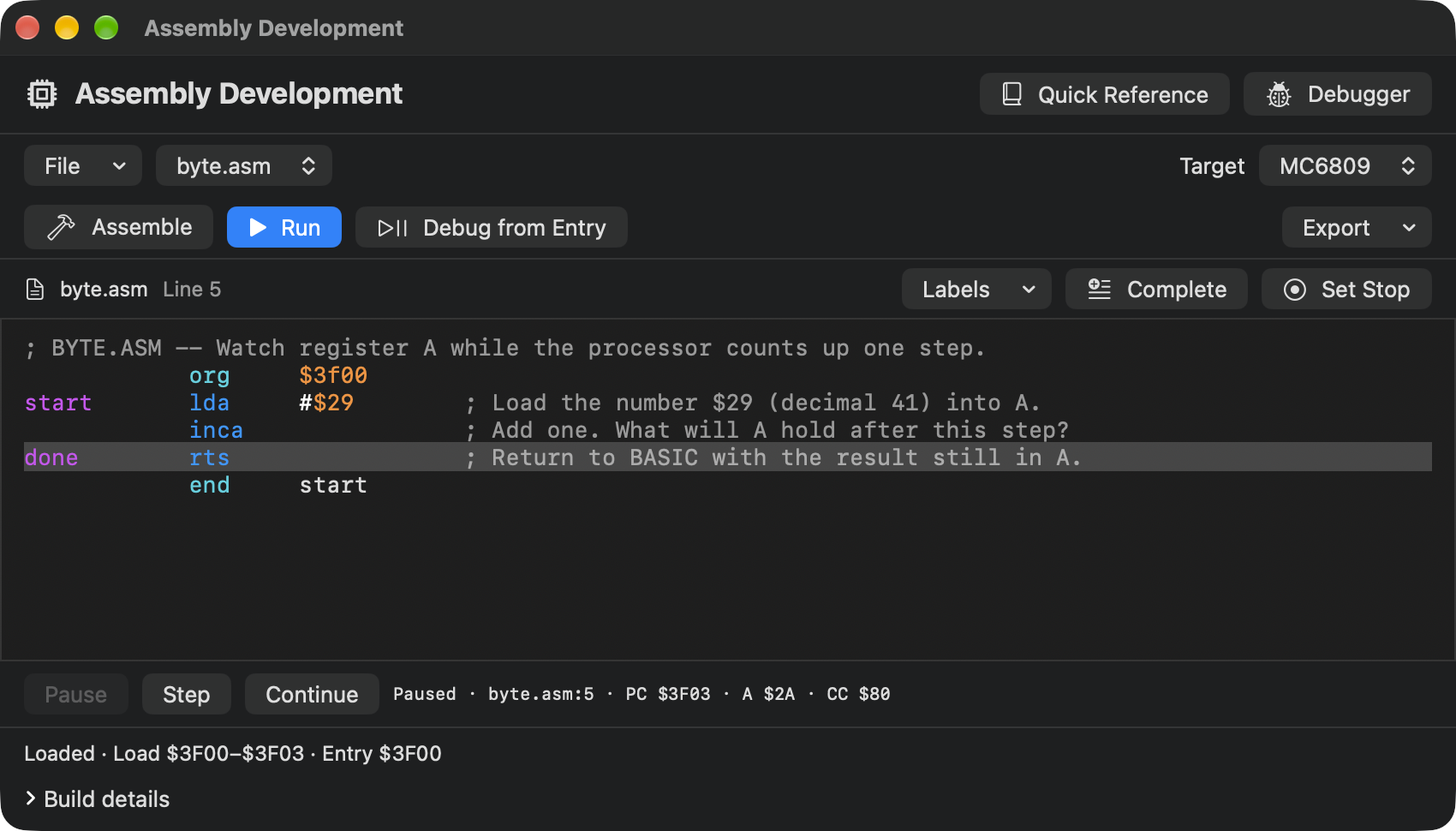
Click Step again. A reads $2A, or 42. PC reads $3F03, the address of RTS. INCA occupied just one byte. The letter A in $2A is a hexadecimal digit worth ten. The A beside the value in the footer names the register holding it.
Let BASIC have its turn
Choose Continue. RTS returns control to the caller. VCC Plus started this program with a BASIC return address ready for it, so BASIC can now accept a command. Click the CoCo display, type PRINT 2+3 and press Return. A fresh 5 and OK tell you who is listening.
Did you expect 42 to appear on the CoCo screen? The load and increment did all their work inside the processor. You saw their result because the Mac debugger let you look in A while the machine was paused. Starting with Run would have carried the CoCo straight through all three instructions. You can repeat the experiment with Debug from Entry to catch it again. In Send a letter to the screen, you will give the byte somewhere else to go.
If you came here from the BASIC loop that puts a number on screen, compare the size of a step. BASIC could make a whole statement its next action. Here one step took you only as far as loading a number into A.