
A conversation connected to a workbench
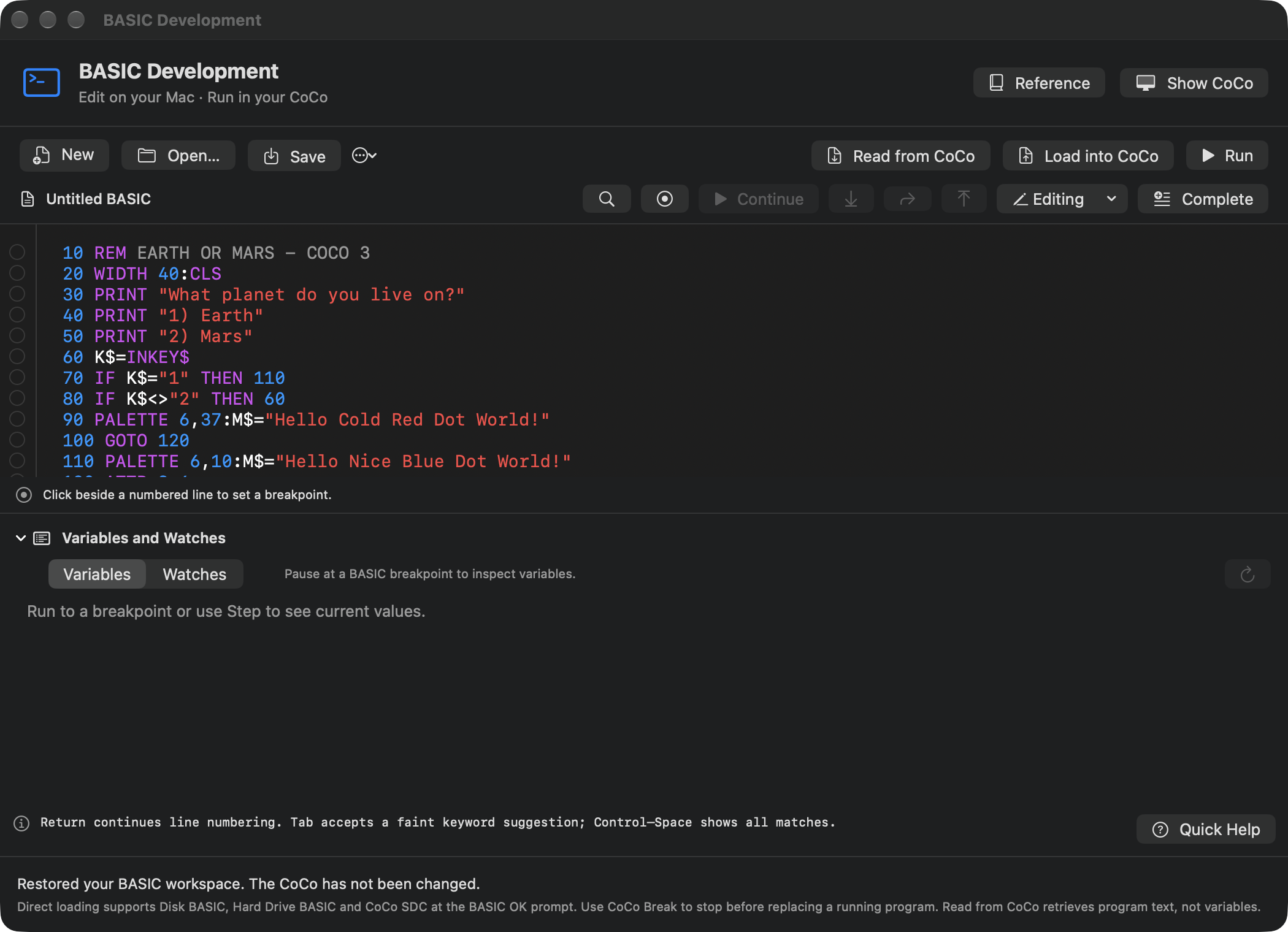
“Make a game where a pilot chooses Earth or Mars” is a good beginning. The next questions are practical: which source is the assistant reading, which version did it build, and what happened when the player chose Mars? VCC Plus connects the conversation to the documents, tools and machine that can answer those questions.
The optional ChatGPT for Mac connection uses scoped local tools through MCP, the Model Context Protocol. In everyday terms, you choose a particular BASIC document, C project or assembly project and the actions it may expose. The assistant can then work through that connection rather than guessing what is in an editor window.
The environment remains useful without AI. You can write, build, run and debug independently. When you do invite a collaborator, the native project tools and installed references provide a shared place to test an idea instead of treating a plausible code sample as a finished program.
Begin by proving the intended connection
In BASIC, Develop → Connect to ChatGPT… opens the connection controls; the same document’s file actions include Local Assistant Access…. C Development has Assistant… for its open project. Assembly Development exposes File → Local Assistant Access….
Save the connection with the permissions you intend, then add it to ChatGPT and begin a Work chat on the Mac. A BASIC connection names one draft; C and assembly connections name one project. Keep separate connections for workspaces you want to use independently.
Start with a read-only question that can only be answered from the source. Ask for the document’s title and an actual line or function, without putting that answer in the prompt. This catches a surprisingly common problem: a conversation may be discussing a remembered program rather than the current shared one.
The exported connection file is a private credential. Keep it outside source repositories. Connection discovery and the permissions granted by that connection are separate. An app update does not silently expand an older exported connection’s scope; export a new one when you intend to enable newly supported capabilities.
Choose how much collaboration you want
| Workflow | What you can ask for | The decision you keep |
|---|---|---|
| Read-only help | Explain the listing, inspect the selected scope, search references and suggest an approach | Whether to make the change yourself or enable editing |
| Proposed edits | Prepare a source change in the shared document or project | Accept or cancel the concrete proposal in VCC Plus |
| Reviewed shared run | Build or assemble the current source and request a supported run | Approve the run and any required replacement of guest work |
| Disposable C playtests | Repeated launches of a supported build in a separate guest when that permission was exported | The scope and test permissions you granted for that connection |
These are useful choices at different stages. Read-only access can answer a question without altering your program. Review-and-run access gives a more direct iteration loop. Disposable playtesting is a distinct C capability, not an assumption that every language or every connection can launch arbitrary unattended tests.
Ask for one runnable slice
Begin with a small result you can recognize: display a title, accept one key, show the selected planet and return to the prompt. Make that path work before adding scorekeeping, multiple screens, sound or file saving.
A useful first request might be:
Read the shared project and identify its target and current build method. Make a small Earth-or-Mars choice with the controls already supported here. Explain the proposed edit, build the current revision and test both choices. Report the source revision, actual input and observed output.
For C, prefer documented CMOC APIs and installed libraries before asking for direct hardware code. For assembly, name MC6809 or HD6309 and the display environment. For BASIC, agree which numbered listing and BASIC setup you are changing. Small constraints give both you and the assistant a concrete result to review.
The supplied project starter in Vibe Coding with ChatGPT adds a brief, working rules, setup guidance, testing notes, decisions and a handoff record. That is useful when an experiment grows into a project you want to resume next week.
Let the assistant consult the same references
Project connections include Manual Library tools. The assistant can look up a BASIC command, an assembly instruction, a C API or the supported toolchain workflow in the books written for VCC Plus. This is more reliable than adapting an example intended for another compiler or another machine configuration.
Archive Search has a separate read-only connection exported from Archive Library. It brings historical publications into the investigation while keeping source attribution and page context. Ask for the publication and cited physical page when using a scanned article. OCR text is useful for finding an example, but punctuation and line breaks still need checking against the original.
A good workflow consults the local manuals first, then historical references for the particular question, then broader sources where needed. If a manual, installed tool and observed result disagree, preserve that disagreement as something to investigate. Do not ask the assistant to hide it by rewriting the story around whichever answer sounds most confident.
Build evidence is part of the conversation
The assistant can inspect compiler diagnostics and retained build logs in supported workflows. Ask it to identify the first useful failure and the source revision that produced it. A linker error, a Make failure and a C compiler error are different causes even if the final status simply says the build failed.
A project using its own Makefile keeps that recipe. Use Project Makefile grants the corresponding build scope in C. Review the files shared, the selected recipe and support directories before exporting the connection. A supported request uses the approved build action; it cannot invent arbitrary targets or expand the file scope by implication.
External edits can be refreshed into the project. Clean shared tabs can update, while a conflicting unsaved draft needs local resolution. New files, changed recipes or broader support scope can open a native review of the proposed inputs. Accepting that input set does not itself run Make or launch the guest.
Let a test copy play the game
With Allow Disposable Playtests in a supported C connection, the assistant can create a separate owned 512 KB guest and run the exact approved artifact there. This avoids taking over the shared emulator session in which you may already be working. Supported exported capabilities can select MC6809 or HD6309.
The assistant can send supported guest input, inspect text and capture the actual framebuffer. Verified stops and globals connect debugging to the build evidence. Declared graphics buffers can support deeper visual inspection when the project supplies the required information.
For a save-and-reload test, retain the writable playtest disk and reopen that same disk in another supported test session. A new blank disk is not evidence that a previous save was lost. Ask the test report to identify the retained disk and the exact sequence that wrote and reread its file.
Playtests have bounded allowances. A start may report that it is still starting while setup is verified; it is not yet proof that the program reached its expected screen. When a request budget runs out, the owned guest can still be stopped and its disk retained.
Pictures, audio and time mean different things
A framebuffer capture reports a real image. A paused graphics preview interprets a particular memory state. Taking a picture does not advance the guest. This is useful when comparing two graphics pages without disturbing the stopped program.
Audio capture requires its own exported permission. It records a bounded following interval of the disposable guest and advances that guest during recording, leaving it paused afterward. The capture releases held keys. A short clip therefore cannot establish that a continuously held movement action remained active throughout the interval.
Keep those distinctions in the test report. A screenshot does not prove sound; a recorded interval does not prove every prior key state; a source stop does not necessarily establish a complete animation. The strongest result states both the observed behavior and the limits of the observation.
Keep a useful project after the chat
Save the source, the chosen build configuration and the runnable artifact. Record the target processor, relevant hardware, input steps, actual results and remaining questions. Keep original authorship and component notices with adapted material.
You can then hand off something more useful than a long conversation: a project that another person can build, run and inspect. The C workspace, assembly workspace and debugging tools stay available when you want to take the keyboard yourself. AI helps move the experiment forward; the running computer gives both of you something concrete to learn from.