
Chapter 8 of 8
Deliver the receiver
Imagine handing your program to someone who has only a CoCo and Disk BASIC. They cannot open your source files and click Run. They can load a binary from a floppy. In this chapter you build a single executable from two source files, catch the call where they meet, and give your reader two ways to run the finished disk.
Open the whole project
Save the Dispatch project, expand the ZIP in a working folder, and open Develop → Assembly Development…. Choose File → Open Project Folder… inside that window and select the folder containing these four files. Start with the Disk BASIC profile at its prompt and an MC6809 assembler target. Use a personal copy of any mounted media.
| File | Its job |
|---|---|
main.asm |
Supplies the entry point, packet, expected checksum, destination buffer and screen output. |
receive.asm |
Copies bytes and computes their checksum. The caller supplies X, Y and B. |
vccplus-assembly.json |
Identifies the entry source, additional module and linker script for VCC Plus. |
layout.link |
Places the combined code at hexadecimal 3F00 and selects the symbol start as the entry. |
The two assembly files each name a section called code. Read the first few lines of each. The display module imports receive, promising to find its definition in another object. The routine exports that name, allowing the linker to resolve it. The files can agree on an address and still disagree about what the routine expects. Find the instructions in the caller that satisfy all three inputs in the comment above receive.
Read the address that the linker chose
Choose Assemble. Expand Build details below the source. Log shows two assembler invocations followed by the linker. Listing describes the assembly of each object. Symbols shows where the linker actually placed those sections and symbols. A zero offset at the start of the second object's section can therefore be a perfectly good listing value.
| Symbol or instruction | Initial build | What to look for |
|---|---|---|
start |
$3F00 | First byte of the entry module. The linker reports its section length as $0040. |
jsr receive |
$3F0A | Bytes BD 3F 40. The final two bytes contain the absolute address supplied by the linker. |
inspect |
$3F0D | Next instruction after the call. JSR puts this return address on the stack. |
receive |
$3F40 | First instruction supplied by the second object. Its section takes $000F bytes. |
Select receive.asm in the project and place the caret on receive clra. Choose Set Stop. Set another stop on inspect cmpa expected,pcr in main.asm. Run and confirm the load if prompted. The first stop is in the other module, before CLRA executes. B holds 3. If you examine the two bytes at S in the debugger's mapped memory, they are 3F 0D. The subroutine has a route back into its caller even though the two files were assembled separately.
Continue to inspect. A holds $E3 and the four bytes at received ($3F36 in this build) are 4F 52 42 00. Continue again. The CoCo prints ORB and returns to BASIC. For a deliberate failure, edit the quoted ORB in packet to ORD, leaving expected alone. Run the new build. A is now $E5 at the comparison and the CoCo prints CHECK. Restore the letter B before you make the disk for your reader.
Move the code and keep the source stop
Try this on a separate copy of the entire project. In layout.link change the first line from section code load 3f00 to section code load 4100. Leave the second line, entry start, alone. Save, then Assemble. Before looking at Symbols, predict the second module's new address from the length of the first module.
The source stops are still the CLRA in receive.asm and the comparison in main.asm. Set them if you opened a fresh copy. On Run, the same CLRA now stops at $4140. The stack contains 41 0D. Continue to $410D and check A before finishing. The linker changed the absolute target of JSR to $4140. The packet and its PC-relative load moved together, so their displacement stayed the same. Neither a source stop nor a symbolic operand required you to type an address into the instructions.
The two tested placements are for this short program in the lab's fresh Disk BASIC session. Choosing a new load address also means finding space the guest can spare. A writable address can still contain a BASIC program or another routine you need.
Hand someone a disk
Return to the unmodified $3F00 project. The Export menu offers the DECB binary by itself and a floppy image containing that binary. A loose binary is useful for emulator quickload. Make two new images now to test what someone can do at a guest prompt.
- Choose Export → Export Disk Image…. Enter
DISPATCHas the Disk BASIC filename, leave Install DOS bootloader clear, choose Choose Location…, and save asDispatch-plain.dsk. The eight-letter guest name and the Mac filename serve different purposes. - Open the floppy controls. Preserve anything you need from the current FD0 disk and mount your new image in FD0. At the fresh Disk BASIC prompt, type
DIRand press Return. Look forDISPATCH BIN. EnterLOADM"DISPATCH":EXEC. LOADM puts the records into their assigned addresses and records the entry point. EXEC transfers control there. The greeting for an intact packet isORB. - Export again with the same guest name. This time select Install DOS bootloader and save the new image as
Dispatch-boot.dsk. Mount this image in FD0. TypeDOSon its own. Watch the line underneath it as the loader supplies the full Disk BASIC command. You can still enterLOADM"DISPATCH":EXECyourself on this disk.
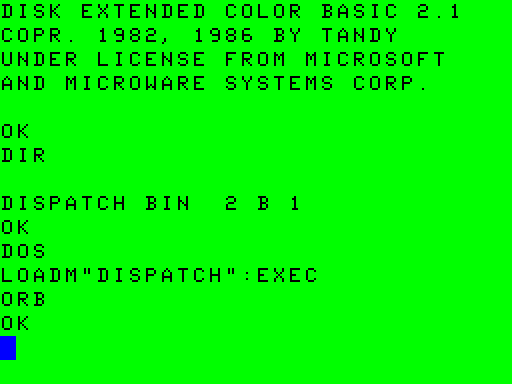
The drive starts the same machine-language program either way. The source stops from the Assembly workspace belong to its direct debugging session. For the disk test, judge success at the CoCo screen. After the final OK, enter PRINT 2+3. Seeing 5 proves that the program returned with BASIC able to accept and execute another command.
A handoff you can repeat
Give a developer the four project files together. Give someone who wants to run the program the DSK, the required Disk BASIC profile, FD0, the name DISPATCH, and the exact launch command. Identify whether that particular disk has the optional bootloader. Include the expected output and how control returns.
If the project assembles but does not stop where expected, compare its current Symbols map with the source file and instruction you selected. If DIR lists the wrong contents, check which image is in FD0 before changing any source. If the disk outputs CHECK, it has already loaded and started the receiver. Look at the packet and checksum of the project you exported. Those observations separate a build problem, a mounting problem and a working program reporting damaged input.