Disk help
Keep your flight
Your flight and settings live on the writable boot disk. A data disk brings the next world into memory. Keep track of which copy you played on and the drive it booted from.
Save your flight
At the PAUSED screen, press S. This saves your current position to the writable COCOMAN.DSK you booted from.
Wait for GAME SAVED. Swap disks only if the game asks for the boot disk. If it does, insert that same writable copy in the drive named on screen and press Enter to retry. After GAME SAVED, press Enter to resume or Q for the quit choices.
Save in a one-drive setup
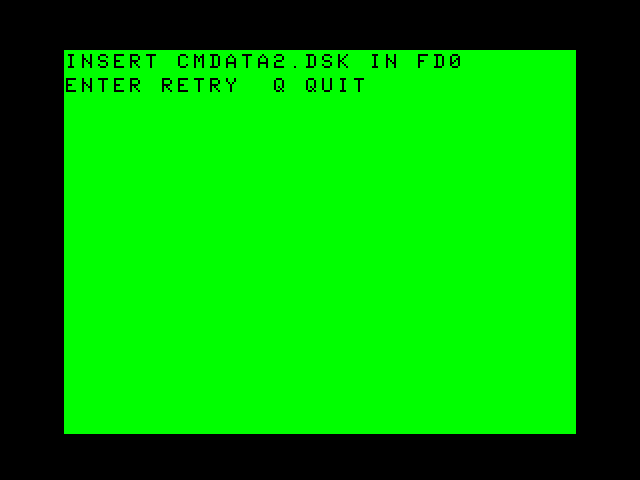
- At INSERT CMDATA2.DSK IN FD0, insert the World 6 data disk in FD0 and press Enter. On another course or boot drive, follow the filename and number on your own screen.
- Stop with your boots on a recognizable landing. Note the site, suit, score and foil count. Press Enter to pause the clock and S to save.
- At INSERT COCOMAN.DSK IN FD0, put back the same writable copy you booted. Press Enter to retry the save. Read GAME SAVED before continuing.
- Press Enter to resume. Keep the data disks ready. The next course load may ask for a different one.
If the boot disk started in FD3
The game returns to FD3 for exchanges. Use that number each time it appears. With a lower boot drive and several drives, CoCoMan searches higher drive numbers in order for a matching data disk. Place a data disk in FD1 before selecting the course if you want that drive searched. Once the prompt names FD0, putting the disk in FD1 leaves the request outstanding.
Load or resume
To resume the paused flight right where it is, press Enter. To replace the current unsaved position with the stored flight, press L while paused. Supply the boot copy and any requested course disk. Look for the landing, suit, score and foil count you saved.
A saved flight retains jetpack fuel. Release Jump after loading before another boost. A data-disk exchange can be necessary even when a save was read correctly.
Continue after turning the machine off
- Save and wait for GAME SAVED. Quit through the confirmation screen to reach Disk BASIC.
- Back up the played boot image once the drive is idle. Store your pristine originals separately. A fresh boot image starts with an empty flight.
- Next time, mount the played boot copy, type
DOS, and press C when setup offers Continue Saved Game. Return a requested data disk from the same edition and check the landmark.
Follow the single-drive save and cold Continue in pictures.
Quit choices
During flight or pause, press Q. At QUIT GAME?, S saves and quits, Q quits without saving, and Enter cancels. If the save fails, the game keeps retry and cancel available. At setup or the title, Q follows that screen’s normal exit to BASIC.
Find your prompt
- INSERT CMDATA1.DSK IN FD0
- Put the Worlds 2–5 image in drive 0. Enter checks again. Data 2 serves World 6 and Data 3 serves Worlds 7–8. Follow the actual filename and drive number.
- INSERT COCOMAN.DSK IN FD0
- Return the writable copy that holds this flight, in the drive indicated. Q during a save or load exchange cancels that operation. During a course-load request, Q quits.
- COCOMAN.DSK SAVE FAILED
- Confirm that the played boot disk is writable, mounted in its original drive and belongs to this set. Press S to retry. Wait for GAME SAVED.
- COCOMAN.DSK SETTINGS NOT SAVED
- Setup could not write your changed input or sound choice. You can play with the choices you just made. For the next boot, mount your writable copy of COCOMAN.DSK in the drive you started from and check its write protection. Select your input and sound again at setup, then choose Go, Continue or Quit to store them.
- NO USABLE SAVE ON COCOMAN.DSK
- Check that you returned your own boot copy from this edition. At pause, Enter resumes the current flight. After returning the correct disk, press L while paused to try again.
- Continue is missing at setup
- A new boot disk has no saved flight. Start from the played copy or a backup made after a successful save. Earlier playtest save formats are incompatible.